Résumé, ATS report and cover letter for one job, in one sitting
One document, read once, then checked, then used as the evidence for a letter about one specific posting. The chain runs here on this page, and the doors at the end carry the result into the tools.
— one source. everything else reads it.
An application is three documents that have to agree with each other: a résumé, a readable version of that résumé, and a letter that only claims what the résumé can back. Most people build the three separately, in three different programs, and find the disagreements after sending. This page is the order that avoids that, and the order runs here rather than being described.
You need one thing to start: a résumé that already exists, in PDF, DOCX or plain text. If you do not have one, open the résumé builder and build from scratch instead.
Do it here
Four steps, in order. Each one calls the endpoint the matching tool calls, and prints what came back.
- 01Read it in
- 02Check
- 03The posting
- 04The letter
- 05Into the tools
Step one: read the résumé in, and correct the reading
A PDF is read in your own browser by the extraction module the tools use. Only the text it produced is posted to the reader, which then returns the structure it could see: the name, the roles, the lines under them, the skills, the education, and the questions it could not settle.
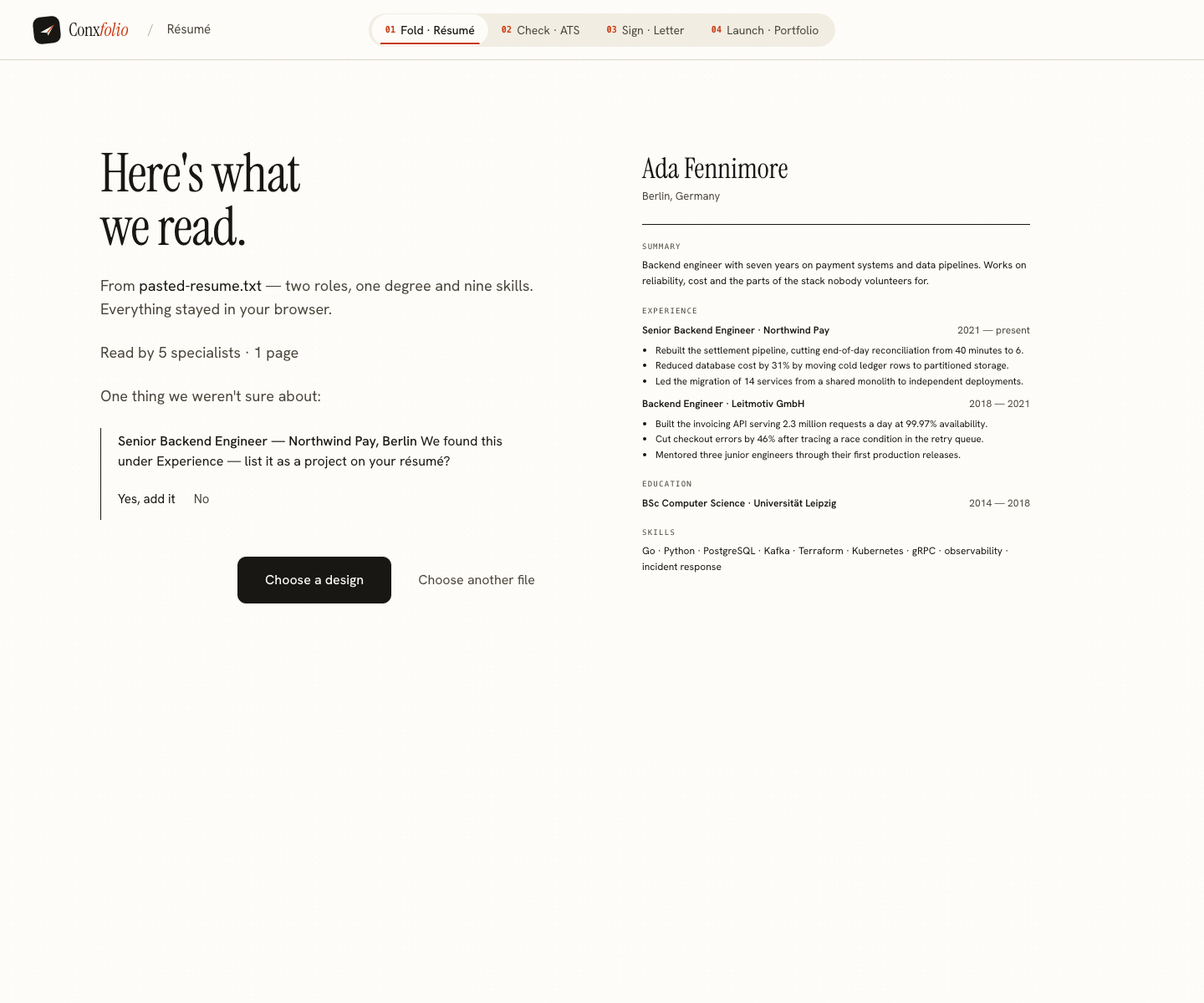
Read the receipt the chain prints before going on. Every later step reads this material, so a company name that landed in the wrong field costs you three times if you let it through. A field the readers could not read stays empty rather than being filled with a guess, and a value that fails their own check that it is a span of your document is dropped and counted. The receipt prints both of those counts.
Step two: check it, and fix from the top
The check needs no job description. What comes back is a score, the multiplication that produced it, and the findings ordered by the points each one costs. The chain prints the sum, so the number is never something you have to take on faith. The arithmetic article covers what each dimension measures if one of the three surprises you.
Work down the findings and stop when the next fix stops being worth the evening. The cost is printed on each row precisely so you can make that judgement rather than treating eleven suggestions as eleven emergencies. Run the check again afterwards and the two numbers tell you what the work was worth. The ATS checker keeps a history of its own reports for the same reason.
Step three: give it the posting, in full
The posting is what turns a general document into an answer to one job. Paste the whole advertisement. The receipt prints how many requirements the engine read out of it, which is the honest measure of how much context it has. Three words in the role field is not a brief, and the number will say so.
Reading a posting properly is most of the work here. A requirement stated twice is one requirement; a preference worded as a requirement is still a preference.
Step four: write the letter, and read the traces
Open the cover letter builder when you want the paper, the voice and the full editing surface. The chain writes the letter with the same engine so you can read what it claims before you decide whether the letter is worth the next twenty minutes.
What comes back is a set of evidence paragraphs, each carrying the index of the résumé line it was taken from. The receipt prints that index and the line itself, side by side. Read those traces. A claim with a trace is one your document already supports; a paragraph with no index is one you would have to stand behind yourself.
Two numbers matter more than the prose. The first is how many requirements the engine read. The second is the gaps list: the requirements your evidence cannot support, named rather than quietly asserted. That list is the interview you are about to have, written down in advance.
Step five: take it into the tools
The doors at the end of the chain hand the same document to whichever tool you want next. Each door writes the text into this browser and links to the tool, which reads it through the import an uploaded file goes through. So the screen that opens is the real review, read by the real rules, with the real question where the rules are unsure. Accepting it creates a new entry, and a résumé already saved on this device is untouched.
From there the work is ordinary editing: fix what the check priced highest in the builder, choose the paper for the letter from 12 designs across 5 families, and export. DOCX is written in your own browser; PDF is rendered and streamed back. Neither carries a watermark and neither costs anything.
What to do with the leftovers
You now have a corrected, structured version of your work in this browser. The portfolio builder reads the same roles and projects and turns them into a page in one of 22 authored designs, which is worth an extra ten minutes if the job would look at one. That chain has its own page. And the next application starts at the letter, because the résumé and its check are already done. The second application is faster for exactly that reason.
If the file you send is the thing you want to be sure about, the export chain renders the PDF and then reads it back through the checker, so you see the number the file scores rather than the number the text scored. If the posting is German, the Germany chain runs the same sequence with the Lebenslauf conventions checked on top.
Start with the document you have
Import a PDF, DOCX or text résumé. Everything read out of it is shown for review before it enters the editor.
Open the résumé builderOr check a résumé firstQuestions
- Does the chain on this page really run the tools
- It calls the same endpoints the tools call, with the same payloads: the résumé reader, the ATS score, and the letter engine. Every number printed in a receipt came back in one of those responses. Nothing on this page simulates a result.
- Do I have to use all four tools
- No. Each one has its own address and works on its own. The bundle is an order that saves repetition, because the same source document feeds the check and the letter.
- Does anything I paste here get saved
- Not by this page. The chain holds your document in the browser tab while you walk it, and drops it when you close the tab. A door is the only thing that hands it on, and it hands it to the tool on this same device.
- What if the letter claims something my résumé does not show
- It will not. Evidence paragraphs are selected from your own résumé lines and carried with the index of the line they came from, and the receipt prints that index beside every claim. Requirements in the posting your evidence cannot support are listed as gaps.
- Will a door overwrite the résumé I already saved here
- No. The door hands the text to the same import an uploaded file goes through, so what opens is the ordinary review screen. Accepting it makes a new library entry, and anything already saved keeps its own name and its own contents.
- Is a language model writing any of this
- No. The readers, the score and the letter engine are deterministic code, and each response carries a field saying so. The chain prints that field in its receipts rather than asking you to take it on trust.
Conxfolio is a free set of four career tools: a résumé builder with 37 rendered layouts, an ATS résumé checker that prints its own arithmetic, a cover letter builder that traces every proof paragraph back to the line it came from, and a portfolio builder with 22 authored designs. There is no account to create, nothing is held back for a paid plan, and no language model is used anywhere in the product, so the readers, the score and the letter are deterministic code you can check.