How to export a DOCX résumé without Office
The Word document is assembled in the page you are looking at and handed straight to the browser's download. The export was measured making no network requests at all.
— built here, not fetched.

Asking for a Word document is a reasonable request and an awkward one. Recruiters paste résumés into their own templates, some portals accept DOCX and refuse PDF, and a hiring manager sometimes wants to leave a comment. If you do not own Office, the usual answer is to upload the file to a converter, which means handing your work history to a third party to get a file format.
The résumé builder writes the DOCX itself, in the tab.
What a DOCX actually is
A zip file with XML inside it. The Office Open XML format describes a document as a tree of paragraphs with styles, plus a small set of bookkeeping files: the content types, the relationships, and the document body. Nothing about it requires Microsoft software to write, only correctness.
The export here builds that tree from your content, writes the bookkeeping files, and zips the result with the browser's own compression. The measured file held three entries, about four and a half kilobytes uncompressed, and contained no document-properties folder at all.
The measurement
The point of building it locally is verifiable rather than philosophical, so it was measured. With every network request logged from the moment the export was pressed, the DOCX download produced zero requests. The PDF export, pressed straight afterwards in the same session, produced exactly one: the render call to our server. That contrast is the whole difference between the two formats here.
What that means for you
Three consequences worth having. The text of your résumé does not travel anywhere to become a Word file. There is no queue, no size limit and no rate limit on the export, because nothing on a server is involved. And it works with the network off, which is occasionally the difference between sending an application and not.
Where to find it
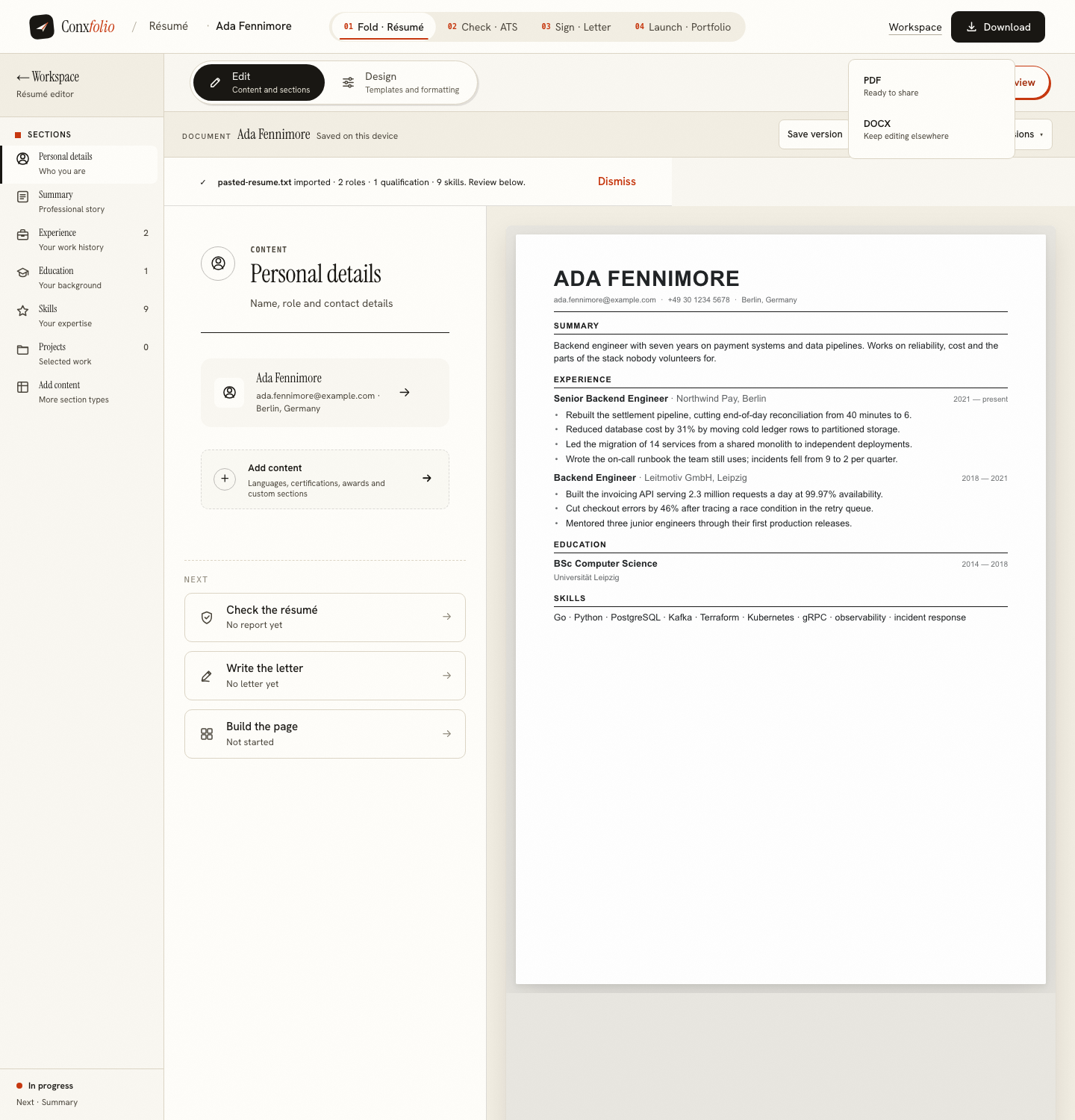
One menu, labelled Download, in the document bar. It holds PDF and DOCX and nothing else. Neither is marked premium, neither is watermarked, and there is no third entry that asks for a card. What free covers here is listed on making a résumé without paying.
The honest limits of a DOCX
A Word document is a description that the recipient's machine renders, using the fonts that machine has. That means the DOCX carries your structure faithfully and your design approximately. If the layout is doing work, as it does in a designed single-column page with careful spacing, send the PDF as well and let the recipient choose.
It also means a DOCX is easy for a parser to read, which is why some portals prefer it. The file format guide covers what to send where, and the column guide covers the layout decision underneath it.
Going back the other way
If somebody edits the DOCX and sends it back, import that file here. It is read in this browser, and the review lists every field beside the text it came from so you can see what changed and what was misread before it enters the editor. Fields that fail the check that they are a real span of the document are dropped and counted rather than guessed, as described in dropped fields and why they are counted.
Then check the file
Run the result through the ATS checker. It reads the text an extractor would get and prints the arithmetic behind the score, along with what it read in words, lines and recognised headings. A DOCX usually extracts cleanly, which is one of the reasons to have one, and the check tells you rather than leaves you hoping.
When a portal insists on Word
Some application systems accept DOCX and refuse PDF, usually because their own parser was built around it. That is a good reason to keep a Word copy ready rather than a reason to prefer the format. Upload the DOCX where it is demanded, and attach or link the PDF wherever a human will read it.
If a portal accepts either, the decision is about extraction rather than taste. Both formats parse well when the underlying layout is simple, and both parse badly when it is not, which is why the guide on tables and text boxes matters more than the file extension. Run the file you intend to send through the checker and read the counts before deciding.
The other formats people ask about
Plain text is occasionally requested by an older portal, and the simplest route is to open the DOCX and save it as text from whatever opened it. There is no RTF or ODT export here, and pretending otherwise would be worse than saying so.
Importing is broader than exporting. PDF, DOCX, plain text, Markdown, RTF and images are all read, including a photograph of a printed page and a PDF that asks for a password, which is covered on opening a password-protected résumé. The asymmetry is deliberate: a résumé arrives as whatever the person has, and it leaves as one of the two formats employers actually ask for.
Get a .docx out of a browser
Import, edit, design, then download a Word document built in the page itself. Free, no account.
Open the résumé builderCheck it afterwardsQuestions
- Which applications open it
- Word, LibreOffice Writer, Google Docs, Apple Pages and anything else that reads Office Open XML. It is a standard document with the standard container.
- Is it a real document or an image
- A real document. The paragraphs, headings and lists are text with styles, which is why it can be edited after it opens.
- Does the export need the network
- No. It was measured at zero network requests. The XML and the zip container are assembled in the page and handed to the browser's own download. The PDF export is the opposite: it makes exactly one request, to be rendered by a real browser engine on our side.
- Will the design survive
- The structure will. The fine typographic detail of a design belongs to the rendering, so it lives in the PDF. Send the DOCX when somebody wants to edit and the PDF when the layout is part of the message.
- Is there a limit on how many I can export
- No. The DOCX export never touches a server, so there is nothing there to limit.
Conxfolio is a free set of four career tools: a résumé builder with 37 rendered layouts, an ATS résumé checker that prints its own arithmetic, a cover letter builder that traces every proof paragraph back to the line it came from, and a portfolio builder with 22 authored designs. There is no account to create, nothing is held back for a paid plan, and no language model is used anywhere in the product, so the readers, the score and the letter are deterministic code you can check.