How to write a résumé without Microsoft Word
You can write the whole résumé in a browser and still hand somebody a Word document at the end. The DOCX is assembled in the page, so no licence and no install is involved.
— they can have their .docx.
Word is a reasonable thing not to have. It is a paid licence, it is a large install, and on a Chromebook or a phone it is not really an option. The awkward part is that a proportion of employers and portals still ask for a Word document by name, so the goal is to write without Word and still produce one.
The résumé builder does that, and the mechanism is worth stating plainly because it explains the limits as well as the capability.
Where the writing happens
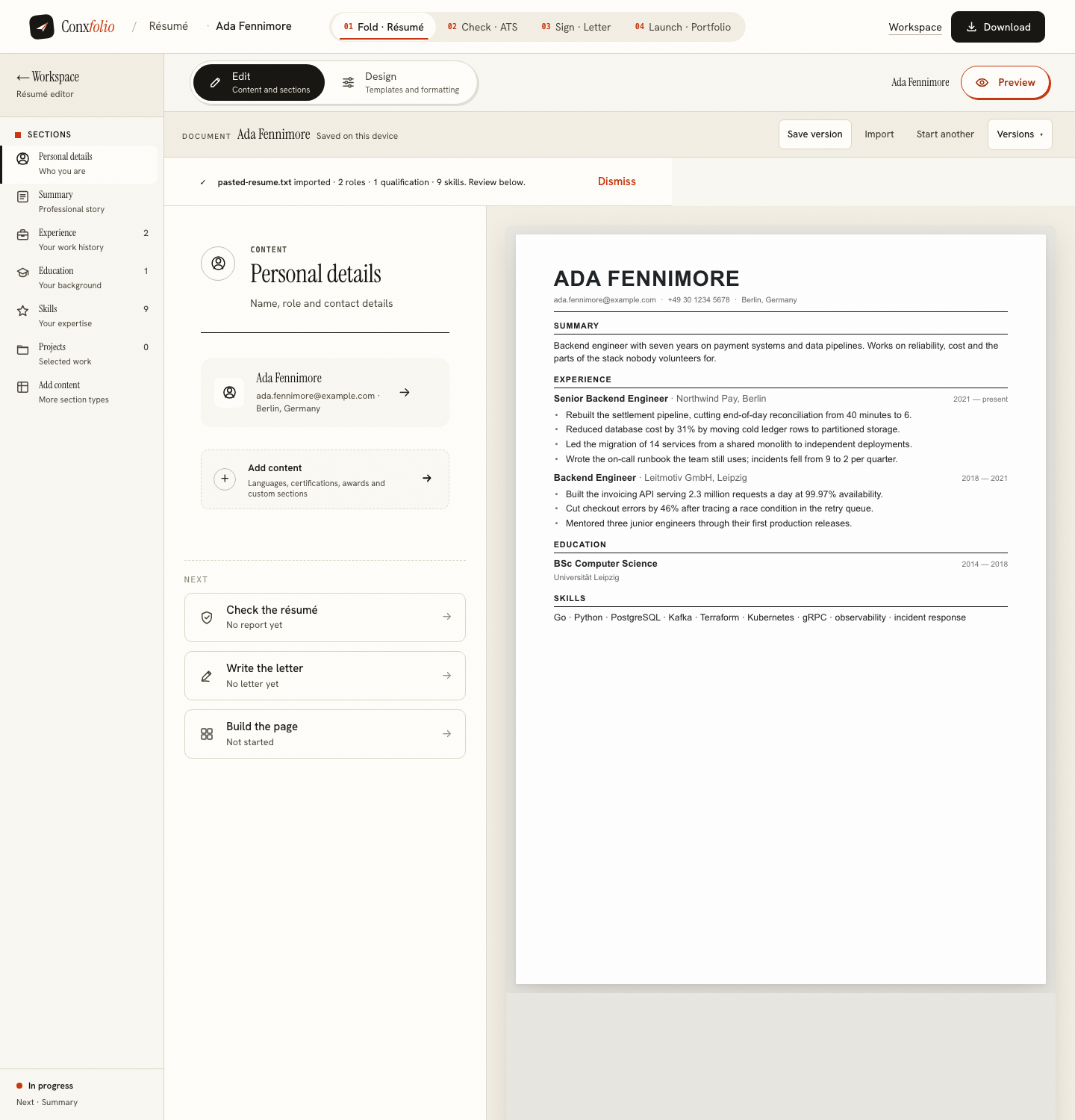
In the page. The editor holds the content in sections, and the rendered document sits beside it and changes as you type. There is no document format underneath, in the sense that there is no .docx on disk being patched. There is structured content, and a design that renders it.
That separation is the reason switching design costs one click rather than an afternoon of moving text, and it is the subject of a design is not a rewrite.
Where the DOCX comes from
At export time the page assembles an Office Open XML document: the XML that describes the paragraphs and their styles, the relationship files, the content types, and the zip container that holds them. All of that is built in the tab. The export was measured making zero network requests, and the file it produced was a three-entry zip of about four and a half kilobytes.
The consequence for you is that no licence, no install and no server is in the way. The consequence for the file is that it carries the document's structure rather than a rendering of it, which is the honest limit described in the next section.
What the DOCX keeps and what it drops
It keeps the words, the order, the headings, the roles, the dates and the lists. It does not carry the typographic detail of a design, because a Word document is not a rendering, it is a description that Word renders on the recipient's machine with the fonts that machine has. That is why two formats exist here rather than one.
The practical rule: send the PDF when the layout is part of the message, and the DOCX when somebody has said they want to edit it or when a portal asks for Word specifically. The file format guide covers which portals ask for which.
Coming from a Word document you already have
Importing a DOCX works the same way as importing a PDF: the file is read in this browser first, and the review lists every field beside the text it came from, with anything it could not find reported as not found. Correct it there, before it reaches the editor. A field that fails the check that it is a real span of your document is dropped and counted rather than guessed at, which is explained in dropped fields and why they are counted.
The PDF, and why it is different
The PDF is not built in the browser. It is rendered on our server by a headless browser engine from the same design you are looking at, which is what makes it a real A4 page with real type rather than a screenshot. The measured export was a single A4 page at 594.96 by 841.92 points. That route is the only part of the export path that touches the network, and it writes nothing to disk or to a database.
Checking the result without Word
Once the file exists, run it through the ATS checker. It reads the text the way an extractor would and prints the multiplication behind the score, so a layout that is losing your text shows up as a word count far below your page. That is the same check somebody using Word should run, and it does not care which application produced the file.
What this does not claim
It does not claim a DOCX from here is indistinguishable from one authored in Word, because a designed page and a word-processor document are different objects. It does not predict what any employer's software will do with either. It states what the files are, and the comparison with a Word template says plainly where a word processor is the better tool.
Two files, one set of words
The practical result of writing in a browser is that you end up with two artefacts from one source. The PDF is the designed page, fixed, the same on every machine. The DOCX is the same content as an editable document. Neither is a conversion of the other and neither goes stale when you change a line, because both are produced from the content at the moment you press the button.
That matters when an application wants both, which happens more often than it should. It also matters for a targeted version: change three lines for a particular posting, export both again, and the pair stays consistent. The tailoring guide covers which lines are worth changing, and it is fewer than most people think.
No licence, and still a .docx
Write it in the browser, export DOCX and PDF, keep the file. Free, no account, 37 designs.
Open the résumé builderCompare with a Word templateQuestions
- Will the DOCX open in Word
- Yes. It is an ordinary Office Open XML document with the standard container, so Word, LibreOffice, Pages and Google Docs all open it.
- Is the DOCX a converted PDF
- No. It is written as a document, with real paragraphs and headings, not an image of a page. That is why it can be edited after it is opened.
- Do I lose the design in the DOCX
- Some of it. A DOCX carries the text structure rather than the rendered layout, so the typographic detail of a design lives in the PDF. Send the PDF when the design matters and the DOCX when the recipient wants to edit.
- Does the export cost anything
- No. PDF and DOCX are both free, neither is watermarked, and there is no paid tier holding either back.
- Can I go the other way, from Word into this
- Yes. Import the DOCX and the review lists every field beside the text it came from, so a bad reading is corrected before it enters the editor.
Conxfolio is a free set of four career tools: a résumé builder with 37 rendered layouts, an ATS résumé checker that prints its own arithmetic, a cover letter builder that traces every proof paragraph back to the line it came from, and a portfolio builder with 22 authored designs. There is no account to create, nothing is held back for a paid plan, and no language model is used anywhere in the product, so the readers, the score and the letter are deterministic code you can check.