Changing the layout never touches a word of your content
The reason people avoid changing a template is that they expect to lose something. Here the content and the layout are separate objects, and the product says so on the step.
— pick the paper last; it costs nothing to change.
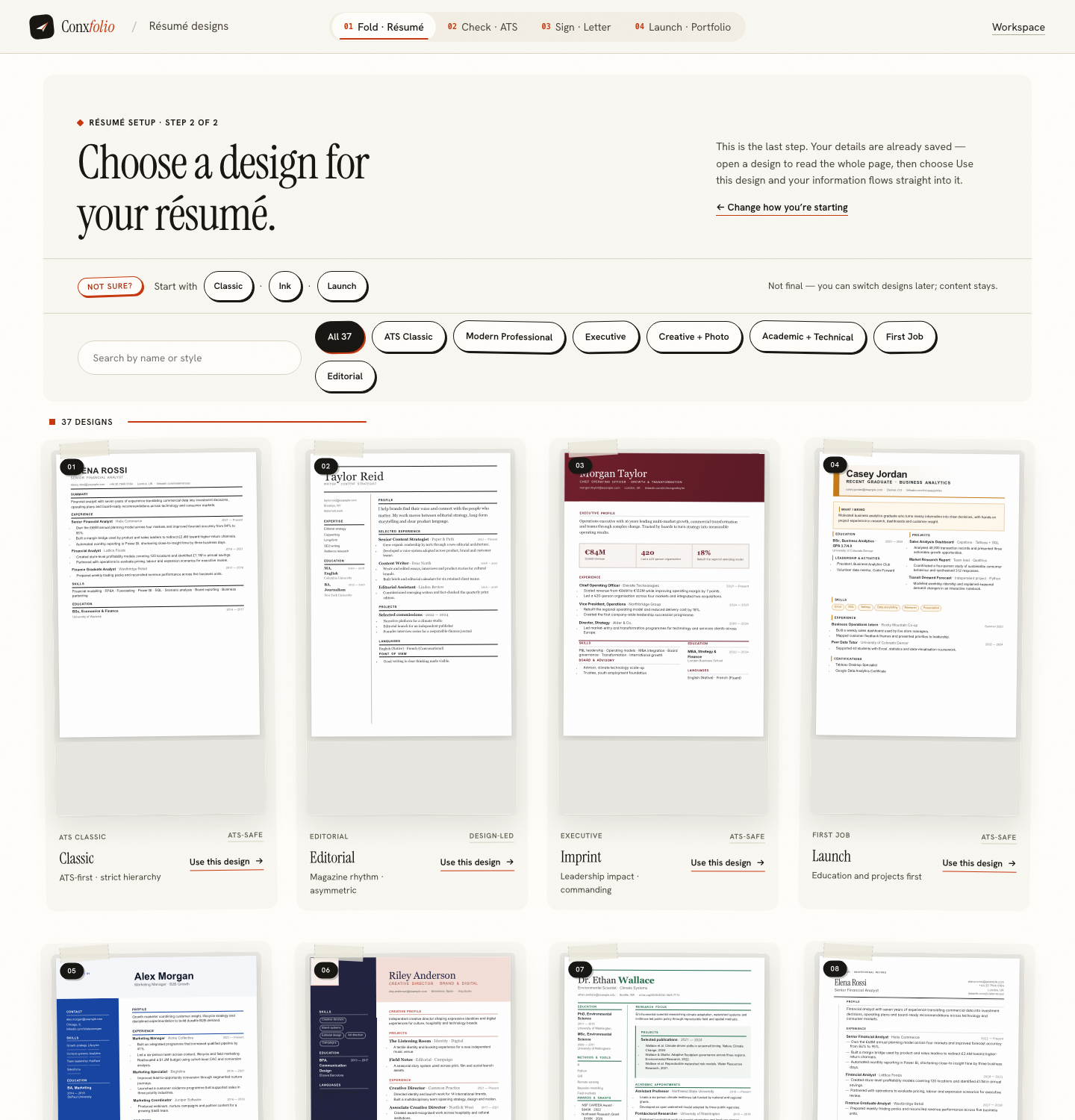
Most people choose a résumé template once and then live with it, because in most tools the template is the document. Changing it means re-entering content, losing a section, or discovering that your three bullet points became two. The cost of the experiment is unknown, so the experiment does not happen.
In the résumé builder the document and the design are separate objects, and the interface keeps saying so.
Where the separation is visible
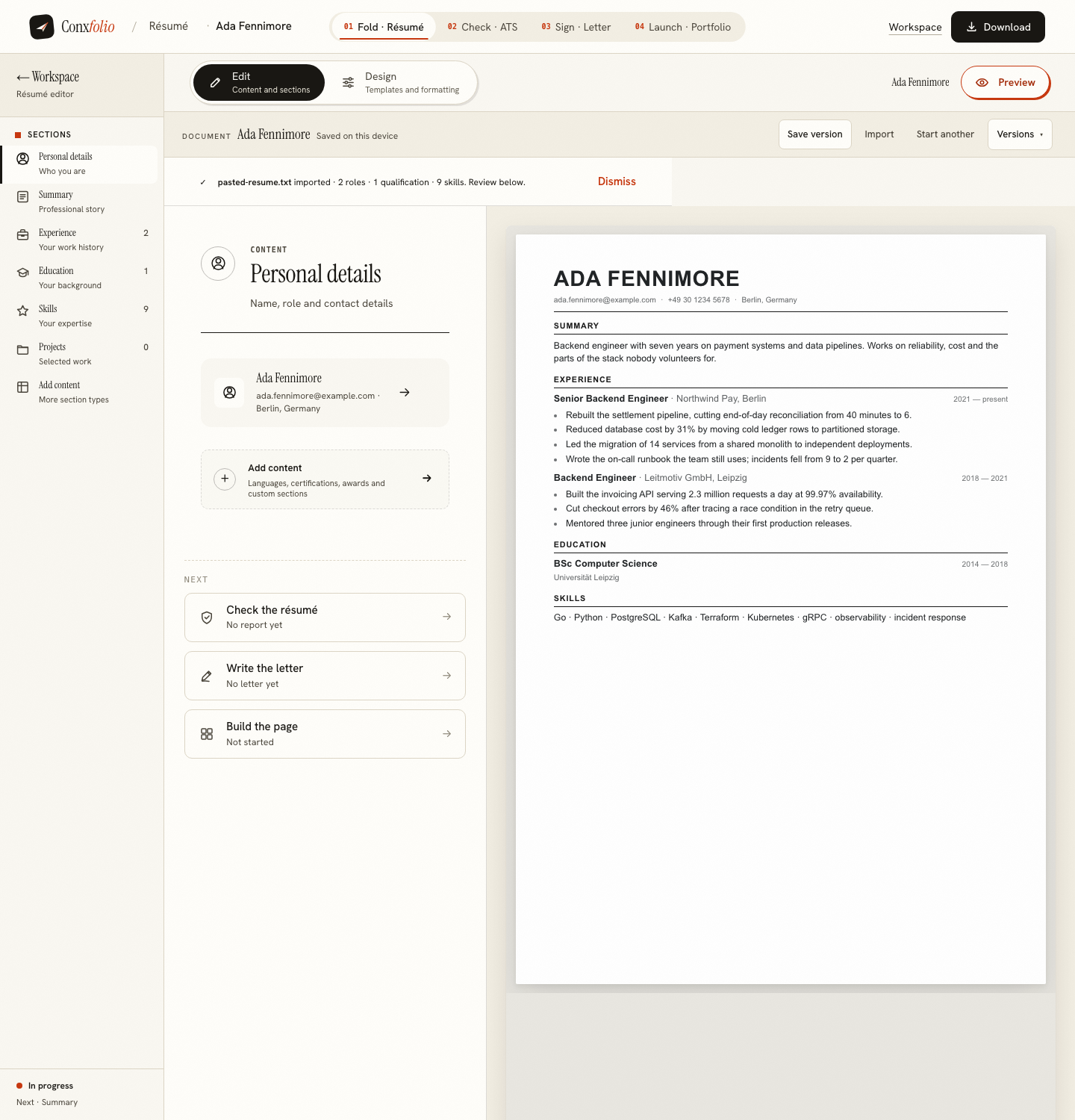
Change design is always one click away in the editor's toolbar, and switching keeps every word you wrote. Inside the editor the top of the workspace has two modes, Edit for content and sections, and Design for templates and formatting. They are different screens over one document, so there is no import, no export and no migration between them.
What the formatting panel touches
Four controls: an accent colour, a typeface with three choices, a text scale and a line height. Above them sits the panel's own sentence, that it adjusts the selected design without changing the structure of your content. That is a precise claim. The panel sets the document's voice and leaves its skeleton alone, which is why moving the scale from 1.00 to 0.94 is a way to fit a page rather than a reason to delete a role.
What the design does change
It changes how a machine reads the file. A single-column layout extracts as one stream; a two-column layout can interleave. That is a real consequence of a visual choice, which is why each card is marked and why the marks mean something narrow and checkable, as set out in what ATS-safe means on a design.
There is a second consequence worth naming. Because the design is a choice rather than a container, the same content can be exported twice in two layouts on the same afternoon: an ATS-marked single column for the portal, and a design-led version for the person who asked for it directly. Neither export touches the other, and neither of them requires retyping anything.
The safety net underneath
Before a bigger experiment, save a version. The editor's document bar carries the control and the version history sits beside it, kept on this device, so an afternoon of edits can be put down and picked up again. That is covered in versions and restoring a draft.
What this makes possible
Choosing the paper last. Write the evidence first, run it through the ATS checker, fix what the fix list prices highest, and only then spend a minute on which of the 37 layouts the page arrives on. In a tool where the template is the document, that order is impossible and everybody starts with the decoration.
Two modes over one document
The editor's top bar has exactly two: Edit, for content and sections, and Design, for templates and formatting. Sections live on the left, the fields in the middle, and the rendered page on the right at all times, so nothing is being changed out of sight. Switching to Design swaps the middle column for the template library and the formatting panel, and the page on the right keeps redrawing with your own content in it.
A third button, Preview, gives the page the whole screen with a toolbar naming the current design and offering to browse all 37. It is a view rather than a stage, and returning from it changes nothing. That is the point of the separation: every route through the product ends up looking at the same document, and none of them can quietly rewrite it.
The limit
Separation is not magic. A design with a portrait frame cannot show a portrait you have not added, a layout that leads with education will look thin if your education section is one line, and a dense two-column sheet cannot fit a page it was never going to fit. The content is safe. Whether it suits the design is still a judgement, and the gallery renders whole pages so that you can make it by looking.
Try three designs on one résumé
Import once, then switch layouts as often as you like. The words, the sections and the entries are untouched by the choice.
Open the résumé builderBrowse the résumé designsQuestions
- Will I lose edits if I change design
- No. The editor treats it that way: Change design switches the whole page at any time, and your content stays. The document and the layout are separate objects.
- What does the formatting panel change
- The accent colour, the typeface, the text scale and the line height of the design you are on. Its own heading says it adjusts the selected design without changing the structure of your content.
- Does changing design change my ATS score
- It can, because the score is computed on the text extracted from a file, and a multi-column layout extracts differently. The design gallery marks which layouts are single-column and text-selectable.
- Can I compare two designs side by side
- Not in one view. The gallery renders every design as a complete page, so the comparison happens there, and switching takes one click once you are in the editor.
- Is there a limit on switching
- No. Nothing about the design choice is charged for, counted or stored against you.
Conxfolio is a free set of four career tools: a résumé builder with 37 rendered layouts, an ATS résumé checker that prints its own arithmetic, a cover letter builder that traces every proof paragraph back to the line it came from, and a portfolio builder with 22 authored designs. There is no account to create, nothing is held back for a paid plan, and no language model is used anywhere in the product, so the readers, the score and the letter are deterministic code you can check.