Save the draft you are about to ruin, on this device, in one click
Editing a résumé for a specific job is an act of vandalism against the general one. A version is how you commit it without losing the original.
— the draft you were on is preserved.
Scoring updated on 25 September 2026. The checker now grades achievement lines in proportion instead of giving full marks after three, weighs how many lines state a result rather than a duty, asks for a date on every career entry, and gives a career written only as projects 18 of the 30 experience points. Rule values and scores quoted below were measured under the earlier rules on the dates shown; the current rules are in how the ATS score is calculated.
Tailoring a résumé means damaging it on purpose. You cut the three roles that are irrelevant to this posting, rewrite the summary towards one job, and drop the section that was carrying your best evidence for a different kind of work. The result is better for one application and worse for every other one.
The résumé builder handles that the way a text editor does, with snapshots you take yourself.
Where the control is
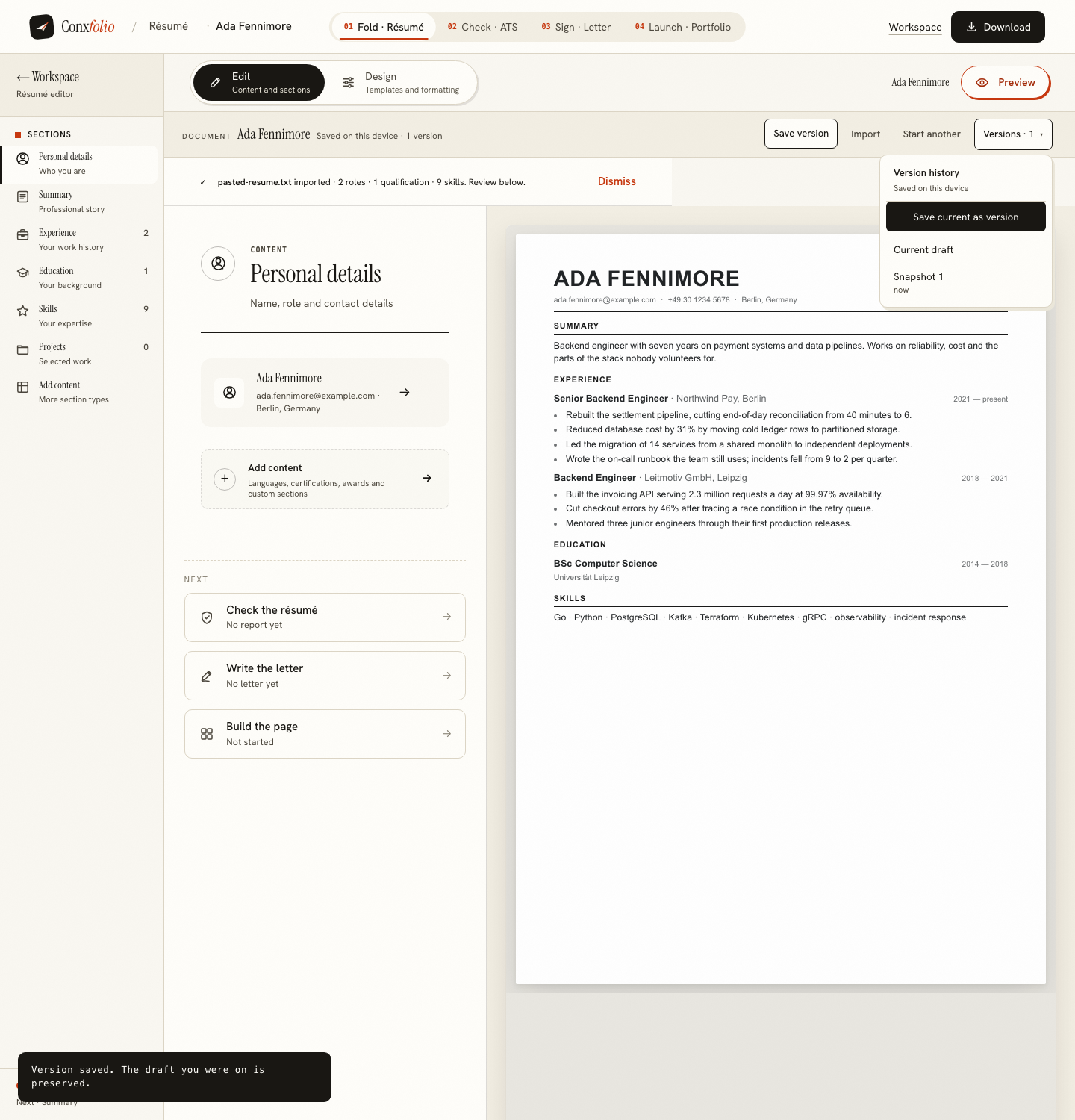
In the document bar above the editor: a Save version button standing on its own, and the same action inside the version history menu beside it. The bar also states the document's condition at all times, saved on this device, with the number of versions after it.
What a save does
We clicked it on a freshly imported résumé. The menu gained a snapshot with a relative timestamp, the bar went from no versions to one, and a message appeared saying the version was saved and the draft you were on is preserved. That last clause is the part that matters. Saving does not move you onto the copy. It takes the copy and leaves you where you were.
What is inside a snapshot
The profile and the résumé as they stood, including the design and the formatting, with the version list itself excluded so snapshots do not nest. Restoring one puts the whole document back rather than pasting text into the current layout, which is the difference between a version history and a clipboard.
Twelve, and then the oldest goes
The list is capped at twelve. That is a real limit worth knowing rather than an infinite archive worth pretending about: on the thirteenth save, the oldest snapshot is dropped. For the usual pattern, a general résumé plus a handful of tailored variants for live applications, twelve is more than most people use in a month.
A snapshot is also the right thing to take before an experiment that is not about tailoring at all. Trying a design-led layout on a document that has always been single-column, moving the text scale down to fit a page, or cutting an entire section to see whether the page reads better without it are all reversible in one click if a version exists and irreversible if it does not.
Everything is on this device
There is no account here, so a version is a copy in your own browser rather than a row in somebody's database. That is the whole trade, and it has a second half: clearing your browser data removes the document and its versions together. Anything you want to survive that should be exported, and the DOCX export is built in the page without sending your data anywhere. The reasoning behind having no account at all is in why there is no account.
A working pattern for three applications
Keep one general résumé and never send it. Before the first tailored version, save a version so the general document is preserved. Then cut, rewrite the summary towards the posting, run the check, export the PDF, and send it. Save that as a version too, because a tailored résumé for one sector is most of the work for the next role in the same sector.
For the second application, restore the general version and repeat rather than editing the tailored one, which is how a document slowly becomes a mixture of three jobs and fits none of them. Three applications a week is six versions, which is half the twelve the list holds, and the export is what survives beyond the browser in any case.
The version history is not the only history
The ATS checker keeps its own reports on the same device, so a tailored draft can be checked, changed, checked again and compared against the earlier report without re-running anything. We used that to measure a restructuring worth 57 points, written up in previous reports and what a fix was worth. Between the two histories, a version to fall back on and a report to compare against, an edit stops being a gamble.
Save a version before you tailor
One button in the document bar. The snapshot stays on this device, and the draft you were working on is preserved.
Open the résumé builderRead why there is no accountQuestions
- Where are versions stored
- On the device you made them on. The version history panel says so in its own header: saved on this device. Nothing is uploaded to make a snapshot.
- How many versions are kept
- Up to twelve. The newest sits at the top of the list, and the oldest falls off the end when a thirteenth is made.
- What does a version contain
- A copy of the résumé and the profile as they were at that moment, including the design and the formatting, so restoring one puts back the whole document rather than the text alone.
- Does saving a version change what I am working on
- No. The message after a save says it: the draft you were on is preserved. A version is a copy taken beside you, not a checkpoint you are moved to.
- What happens if I clear my browser data
- The résumé and its versions go with it, because there is no account and nothing is stored on a server. Export a PDF or a DOCX of anything you want to keep outside this browser.
Conxfolio is a free set of four career tools: a résumé builder with 37 rendered layouts, an ATS résumé checker that prints its own arithmetic, a cover letter builder that traces every proof paragraph back to the line it came from, and a portfolio builder with 22 authored designs. There is no account to create, nothing is held back for a paid plan, and no language model is used anywhere in the product, so the readers, the score and the letter are deterministic code you can check.