How to open a password-protected PDF résumé
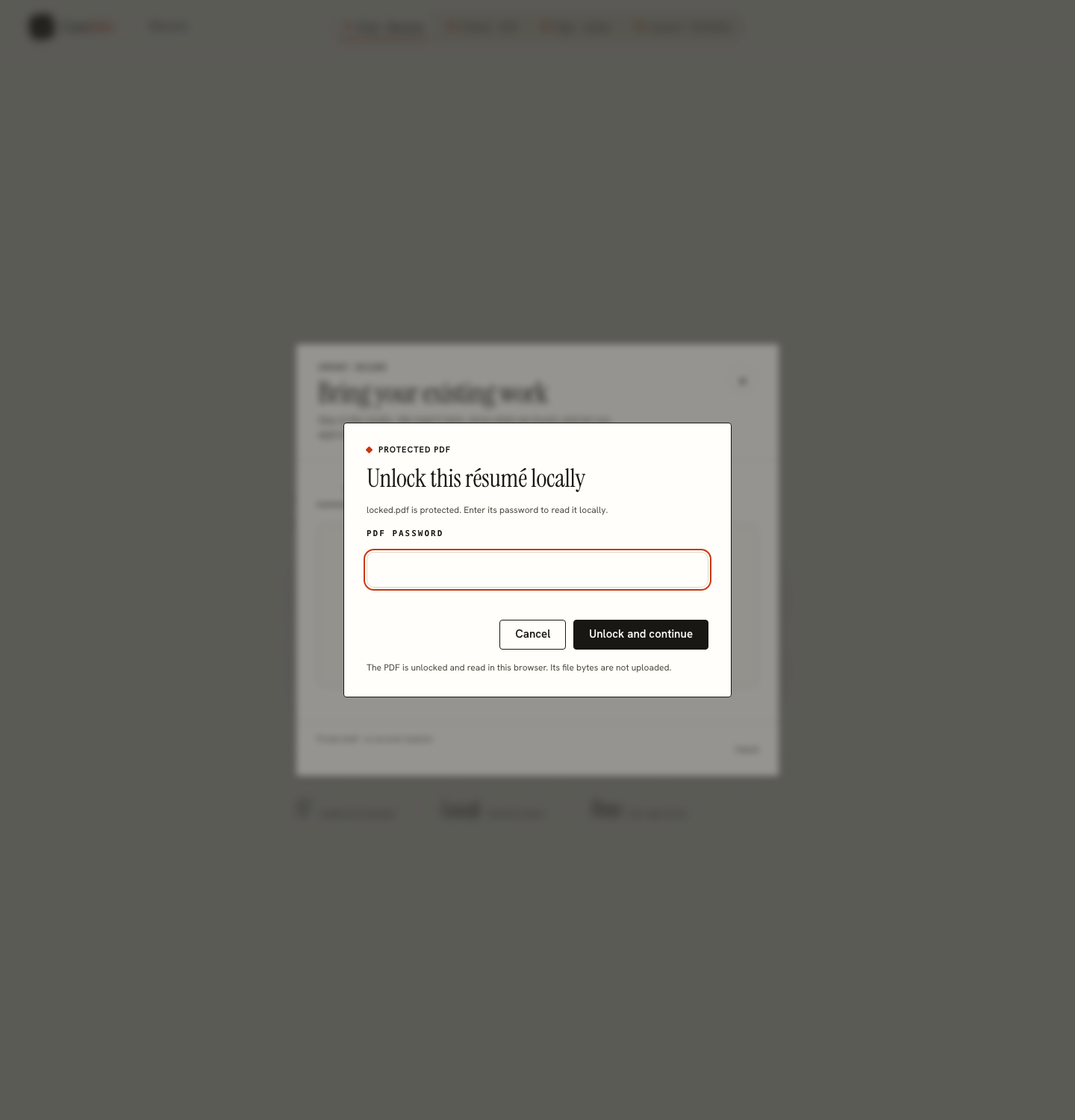
The import asks for the password and unlocks the file in the page. The product states it in its own words: the PDF is unlocked and read in this browser, and its file bytes are not uploaded.
— the password stays here.
Password-protected résumés turn up more often than you would expect. Some outplacement services hand them out that way, some people protect a file before emailing it, and occasionally a PDF arrives locked because the tool that made it defaults to locking things.
The usual answer is an online unlocking service, which means uploading a document full of your personal details, and your password, to somebody you have not thought about for more than four seconds. The résumé builder does not need you to do that.
What happens when you pick the file
Choose the PDF the ordinary way. The import recognises that the document is protected and asks, in the page, for the password. The dialog says what it is doing while it asks: it names the file, states that it is protected, and adds that the PDF is unlocked and read in this browser, and that its file bytes are not uploaded.
Type the password and the reading proceeds exactly as it does for any other PDF. The test file used for this page was a résumé PDF encrypted with AES-256 by an external tool, and it opened and read normally once the password was given.
Why this is done locally
Because the file is already in the browser, and the code that reads PDFs already runs there. Decryption is part of reading a PDF rather than a separate service, so the honest architecture is the one that keeps both in the same place.
The result is that neither the password nor the encrypted bytes travel. What travels later, when you run a check or ask for a PDF render, is text, and only at the moment you ask for one of those things. The full account of what is sent and when is in why there is no account.
What the reading gives you
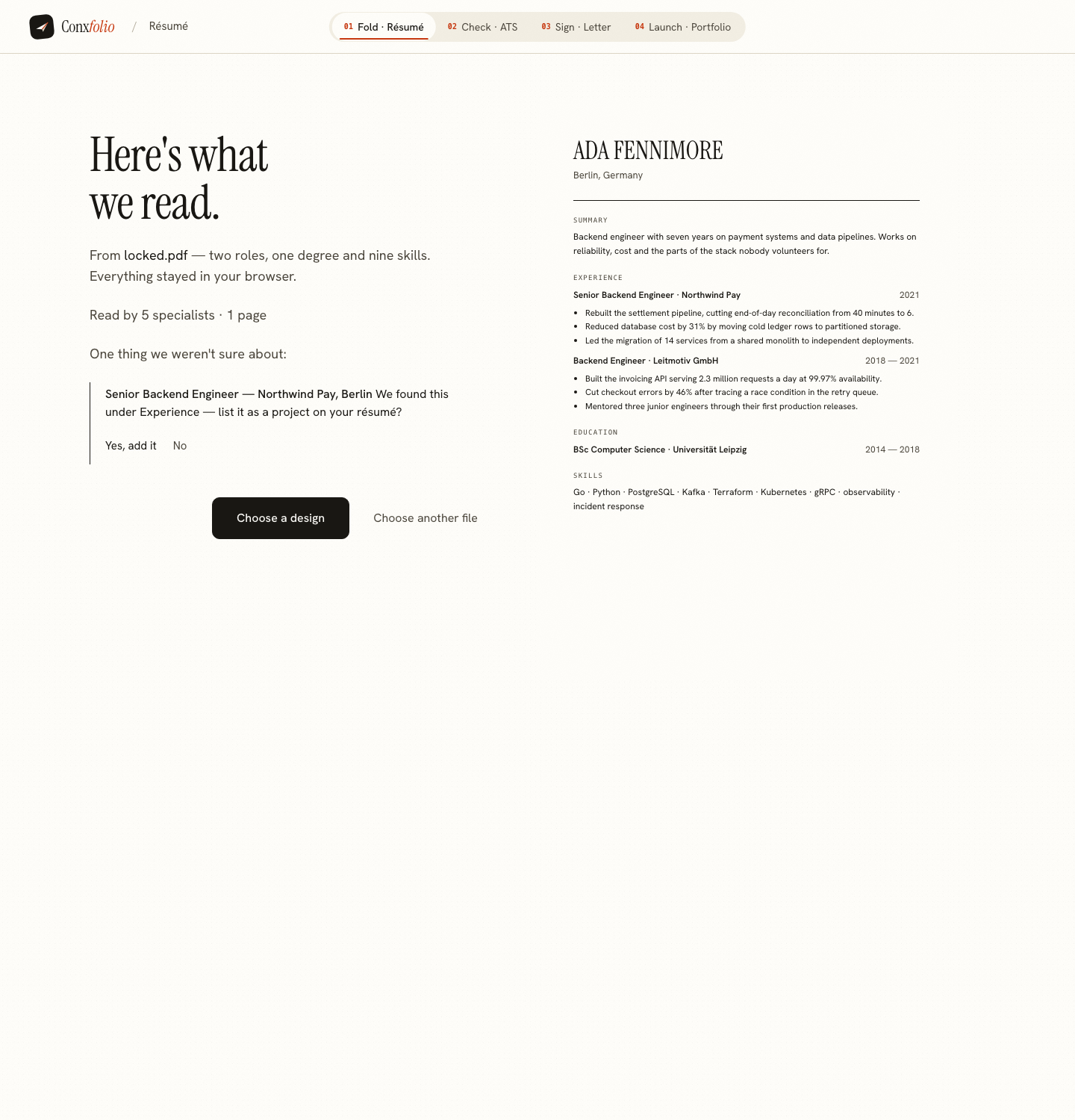
The review lists every field beside the text it came from, with a count at the top of the roles, projects, degrees, languages and skills it found. Fields it could not find are reported as not found rather than filled with a guess, and a field that fails the check that it is a real span of the source is dropped and counted, which is described in dropped fields and why they are counted.
Getting an unlocked copy out
This reads your document. It does not rewrite the file you gave it, so the protected PDF on your disk stays protected. Once the content is in the editor, exporting produces a fresh PDF and a fresh DOCX with no password on either, which is usually what somebody wanted when they went looking for an unlocking service in the first place.
That export path is also the fix for the underlying problem, because the new file is a proper document rather than a decrypted copy of an old one. Check it afterwards with the checker and read what it extracted.
A word about protection you did not set
If the file is locked and you do not know the password, nothing here will help, and that is correct. This asks you for a password; it does not attempt to find one. A page that offered to open other people's documents would be a different kind of product with a different kind of reader.
A permissions restriction, the kind that asks a viewer not to copy or print, is a separate mechanism and is a request to the reader rather than encryption of the content. It is not something this page is about, and it is not something to work around.
Whether to protect your own résumé
Usually not, and the reasons are practical. An application portal cannot type a password, so a protected file fails the upload or arrives unreadable. A recruiter who has to email you for a password often does something else instead. And the protection does not achieve much, because the document is going to be forwarded by the person you sent it to.
Send a plain PDF, name it properly, and keep the sensitive detail off the page instead. What not to put on a résumé and the file name guide cover both halves of that.
The same file at the other three tools
Once the document is in this browser, the rest of the product reads it without asking for the password again, because it is no longer a locked file. The checker scores it, the letter builder can take it as evidence, and the portfolio builder can build a page from the same roles and projects.
If you would rather not import it at all and only want the score, the checker takes a file for one check and keeps nothing, which is the route described on checking a résumé you did not write. That page was written for reviewing somebody else's document and the mechanism is the same: a file read for one measurement, with nothing left behind.
Unlock it where it already is
Import a protected PDF, type the password in the page, and read the document into fields. Free, no account.
Open the résumé builderCheck the unlocked fileQuestions
- Is my password sent anywhere
- No. The unlocking happens in the page. The product states beside the field that the PDF is unlocked and read in this browser and that its file bytes are not uploaded.
- Which kind of protection does this handle
- A PDF that asks for a password to be opened. The test file for this page was encrypted with AES-256 by an external tool, and it opened after the password was typed.
- What about a PDF that is locked against copying
- A permissions restriction is a different thing from an open password, and it is a request to the reader rather than encryption of the content. Nothing here is presented as a way around somebody else's restrictions.
- Can I remove the password from the file
- Not here. This reads the document; it does not rewrite your file. Once the content is in the builder you can export a fresh unprotected PDF or DOCX from it.
- Should a résumé be password-protected at all
- Usually not. A recipient who has to ask for a password often gives up, and portals cannot open one at all. It is worth a plain file for anything you are sending to a stranger.
Conxfolio is a free set of four career tools: a résumé builder with 37 rendered layouts, an ATS résumé checker that prints its own arithmetic, a cover letter builder that traces every proof paragraph back to the line it came from, and a portfolio builder with 22 authored designs. There is no account to create, nothing is held back for a paid plan, and no language model is used anywhere in the product, so the readers, the score and the letter are deterministic code you can check.