How to keep two different résumés at the same time
Duplicate makes a second résumé that shares nothing with the first. This page shows where that control is, and names the route people try first that does not do it.
— two documents, one set of facts.
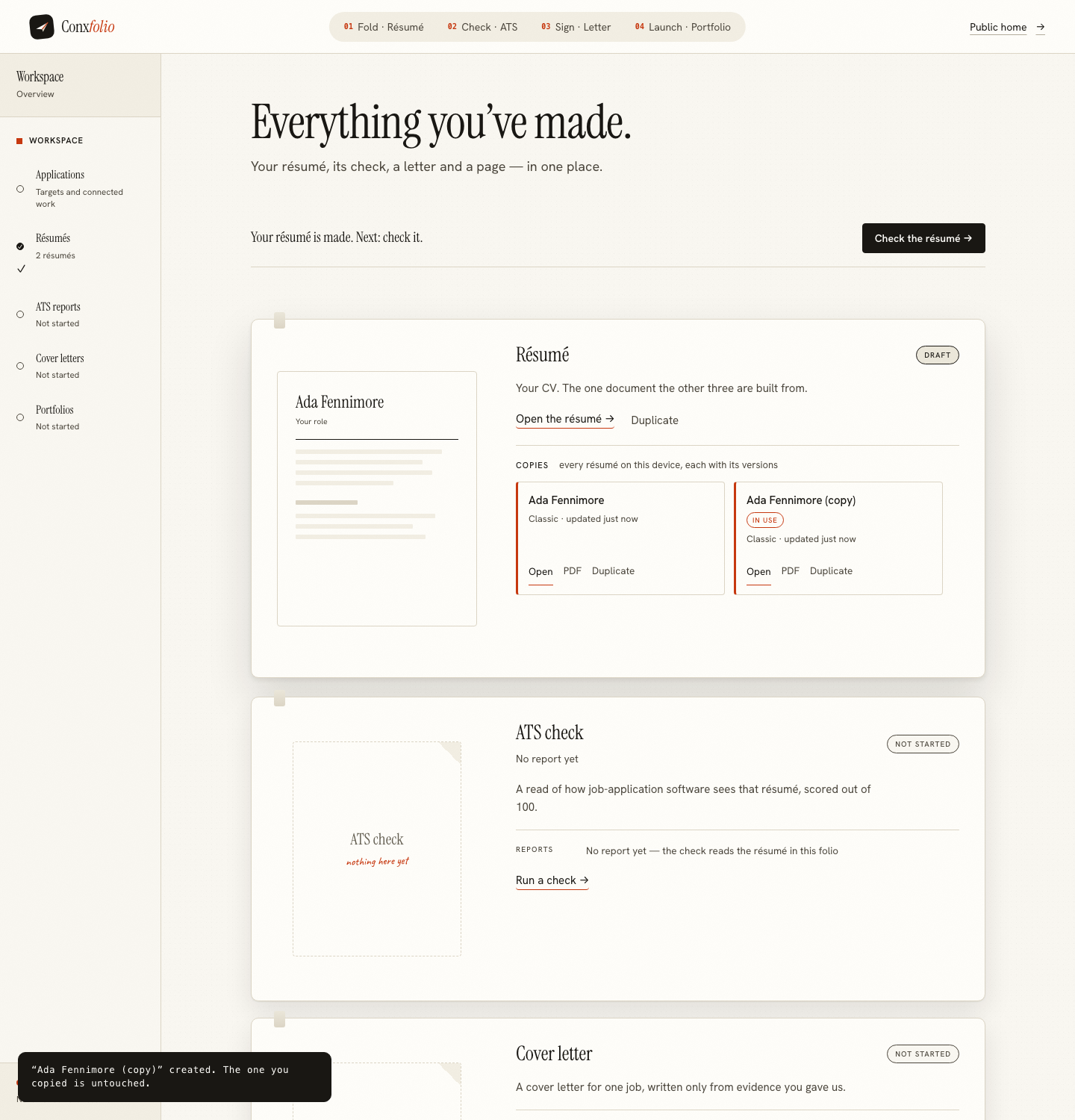
Two résumés is the normal state of a real job search. One for the work you have been doing, one for the direction you are moving in. Or one single-column version for portals and one designed version for a human. The words overlap heavily and the emphasis does not.
The résumé builder supports that, and the control is not where most people look first.
The route that does not do it
The editor's document bar carries a link called Start another, and it leads to the opening screen with the saved résumé offered as one of the ways in. It looks exactly like the way to begin a second document.
Measured on the running product, it is not. Using Start another and importing a second, different résumé left the library holding one entry. Saying so plainly is more useful than a page that describes the feature people expect.
The control that does
Duplicate, on the résumé card where your documents are listed. Measured on the same session, pressing it took the library from one entry to two, the second named as a copy of the first.
The copy is made carefully rather than by reference. The original is frozen first, its current state written down, and the copy is then built from that frozen snapshot. From that moment the two share no content at all, so editing the copy cannot reach the original. That matters because the ordinary way this goes wrong in software is a copy that quietly edits its source.
Versions are a different thing
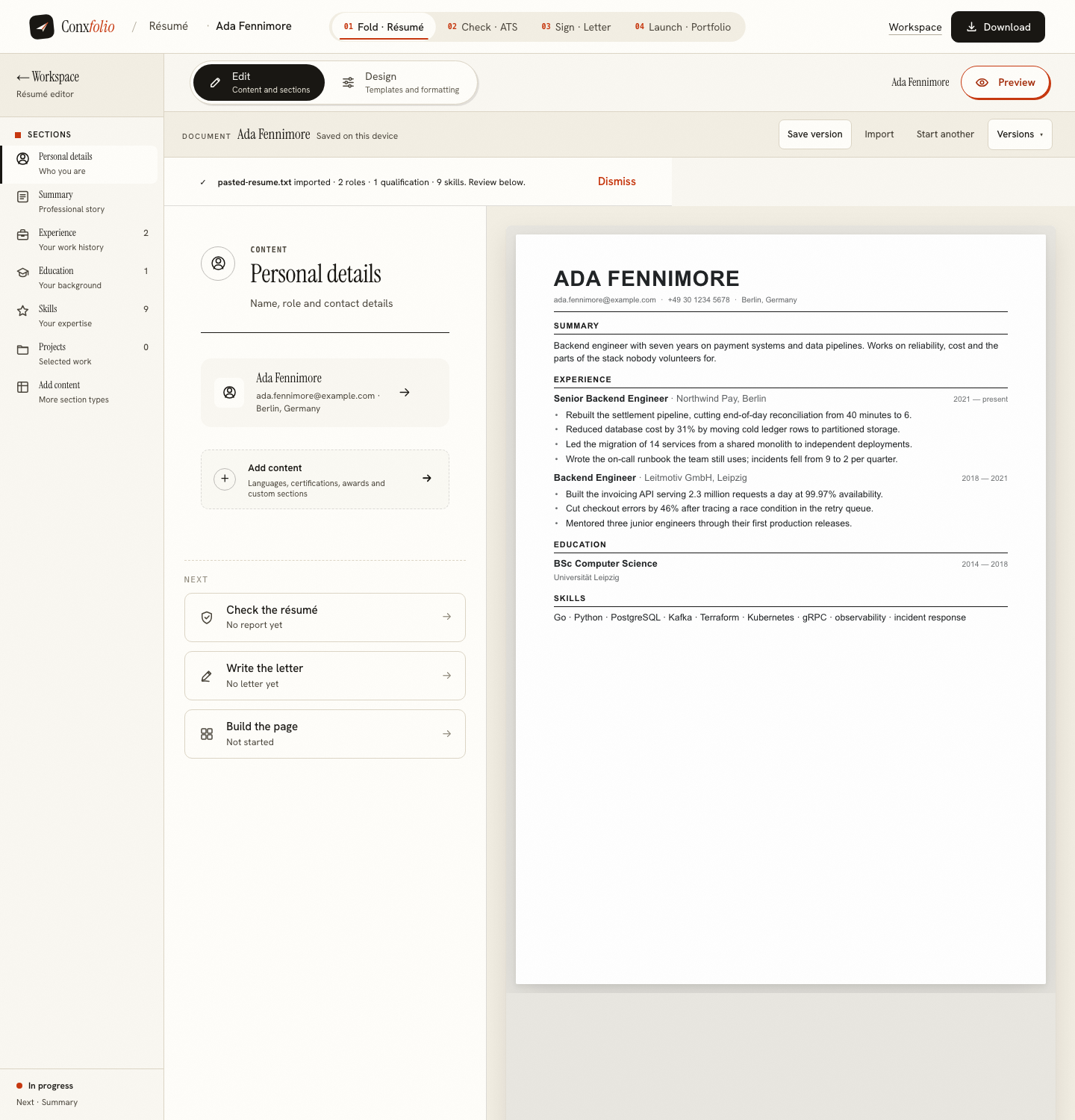
The same bar carries Save version and a version history, which are for a single document. A version is a snapshot you can return to, written once and then read-only. It is the right tool for a rewrite you are not sure about, and the wrong tool for two documents you want to keep developing. Restoring an earlier draft covers that side.
The short rule: versions look backwards, duplicates look sideways.
What to change in the copy
Less than instinct suggests. The facts are the same in both documents, because they are your facts. What changes is the order of sections, the summary at the top, and which achievement lines are present. The tailoring guide is specific about which lines actually earn their place in a targeted version.
Resist rewriting the achievements themselves differently in each copy. Two versions of the same work described in two different ways is how a détail drifts, and the drifted one is the one that gets sent.
Checking both
Run each through the checker separately. A targeted copy that has lost a section to make room for something else usually loses points on completeness, and the report prices that, so the trade is visible rather than guessed. Previous checks keeps what you ran before on the same device, so the two numbers can be compared.
Where the copies live
On the device, in that browser, like everything else here. Two résumés on a laptop are not two résumés on a phone. Moving either one is a file, which is covered in moving a résumé between devices, and exporting both is also the backup, because there is no server-side copy to restore from.
What it will not do
It will not keep the two documents in step. Correct a date in one and the other keeps the old one, which is the price of them being genuinely independent. If a fact changes, fix it in both, or duplicate again from the corrected original and redo the smaller tailoring pass, which is usually the faster route after a few months.
Two documents for two kinds of reader
The most useful pair is not two careers. It is one version aimed at a parser and one aimed at a person. A single-column render with plain headings extracts cleanly and reads a little plainly. A designed version carries more of your judgement and is the right thing to attach to an email that a human will open.
Both are the same words, so the pair costs one duplicate and one design change. Run each through the checker and keep the counts, and read the column guide for what the layout is actually doing to the extraction.
Letters do not need duplicating
A cover letter is written for one posting by design, so the second application gets a second letter rather than a copy of the first. The letter builder takes the posting each time and assembles against it, and the drafts stay in the browser with their versions. Writing one without an account is covered on its own page.
Naming them so you can tell them apart
A copy arrives named after its original, which is fine for a day and useless in a fortnight. Rename each one for the kind of role it is aimed at rather than for the employer, since a document named after one company is a document you will not reuse. Two names that describe directions, not applications, keep the pair useful for months.
If the two came from a profile export rather than from scratch, keep the export itself somewhere as the original record, because it is the one thing neither copy can rebuild. The comparison with LinkedIn's Save to PDF covers what that export is and what it is not.
One set of facts, two documents
Build one, duplicate it, and tailor the copy without touching the original. Free, no account, 37 designs.
Open the résumé builderScore each oneQuestions
- Does Start another make a second résumé
- No, and this is the trap. Measured on the running product, using Start another and importing a second document left one entry in the library. Duplicate is the control that makes a second résumé.
- Do the two copies share anything
- No. The original is frozen first and the copy is built from that frozen snapshot, so editing one cannot reach the other.
- Is a saved version the same as a second résumé
- No. A version is a snapshot of one document that you can return to. A duplicate is a second document you can develop separately. Use versions for a rewrite you might regret and duplicates for two genuinely different documents.
- How many can I keep
- As many as the browser will hold. They are stored on the device, so they are limited by your browser rather than by a plan.
- Do the other tools ask which one to use
- The ATS checker's source step shows the résumé that is currently active by name, along with the option to upload a file instead. Switching which one is active is done where the copies are listed.
Conxfolio is a free set of four career tools: a résumé builder with 37 rendered layouts, an ATS résumé checker that prints its own arithmetic, a cover letter builder that traces every proof paragraph back to the line it came from, and a portfolio builder with 22 authored designs. There is no account to create, nothing is held back for a paid plan, and no language model is used anywhere in the product, so the readers, the score and the letter are deterministic code you can check.