A scanned résumé, measured: 85 where the text scored 88
We rasterised our own PDF at 150 dpi, uploaded the image to the free checker, and wrote down what the recognition path recovered and what it lost.
— the words came back; the name did not.

Re-measured on 26 September 2026. This page first measured the scan on 13 September at 75 against 97 for the text: recognition then broke the achievement lines apart and the content dimension fell from 92 to 49. The reader has improved since and the rules changed on 25 September, so the numbers and pictures below are today's, from a fresh rasterisation of today's export.
A scanned résumé is a picture of a document. Nothing in it is text until something recognises it, and recognition is very good at body text and less sure of everything else. We measured exactly what it loses, on a file we control.
The experiment
Our own PDF export, rasterised at 150 dpi into an image, uploaded to the ATS checker as a picture. The same PDF was measured as text first, at 88, so the difference is attributable to the scan rather than to the writing.
What came back
100 × 30% + 90 × 30% + 71 × 40% = 85. The review read 157 words, 2 roles, 1 degree and 9 skills, and showed the name field empty. Parseability came back at 100 and content at 71, the same as the text version: the roles, the dates, the bullets and the figures all survived.
Where the three points went
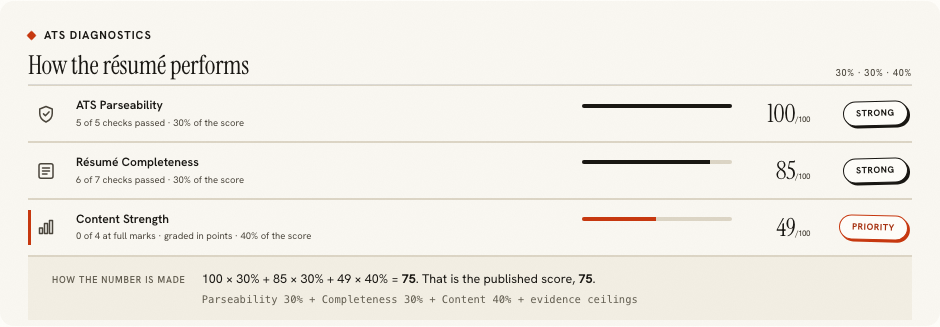
Almost all of it in completeness, which fell to 90 because recognition did not recover the name. The name on this design is the largest type on the page, in capitals, and recognition trained on body text is least sure of exactly that. It also read Universität as Universitat, which costs nothing on the score and is exactly the kind of thing to correct before you send the file anywhere.
Why rescanning does not fix it
Because the loss is in what recognition is good at, not in how sharp the image is. The scan was clean, at a resolution most office scanners exceed, and the body text was recovered whole. A sharper image of the same heading may well lose the name the same way.
The actual repair
Import the scan into the résumé builder, let the reading recover what it can, and fill the rest in the review. The reading never invents: a field it could not read stays empty, which is described in dropped fields and why they are counted. Then download, and the new file has a real text layer.
Proving the repair
Run the check on the downloaded PDF rather than on the editor's text. On our specimen the exported PDF and the same text pasted now score the same, 88 and 88, which is the round trip described in pulling text back out of a PDF.
What to do if the scan is all you have
Import it anyway, because recognition recovers the words reliably and words are the expensive part to retype. The measured reading came back with 157 words, two roles, a degree and nine skills from an image, which is most of a document. What you then supply by hand is whatever the review shows as empty, starting with your name, and anything recognition misspelt. That is ten minutes of correcting rather than an hour of typing, and the download at the end is a real document rather than a picture of one.
What this page does not claim
That 85 is what every scan scores. One document, one resolution, one recognition engine, one day. A crooked phone photograph of a creased page loses much more, and when lines break apart it is the content dimension, 40% of the score, that pays for it. What generalises is the order of the loss: the head of the page first, then the structure of the lines, with the words last.
If somebody has sent you a scan and you are checking it for them, the same measurement applies and the same caution goes with it. A lower score on a scanned document does not mean the writing is mediocre; it often means the name or a section never reached the scorer. Read the review first, and if the fields are plausible while a row is low, the scan is the explanation. Checking someone else's résumé covers how to say that helpfully, and checking a scanned résumé is the step-by-step version.
One preventative note, since scans usually arrive from a specific habit. If your only copy of a résumé is a printed page or a photograph of one, rebuild it now rather than at the moment you need to apply. The recognition path recovers enough to make that a short job today and a rushed one on a deadline. Once a real document exists in the builder, every download from it has a written text layer and the problem does not recur.
Rebuild it as a real document
Import what recognition recovered, correct it in the review, and download a file with a real text layer.
Open the résumé builderChecking a scanned résuméQuestions
- What did the scan actually score
- 100 × 30% + 90 × 30% + 71 × 40% = 85, measured on 26 September, against 88 for the same document as a text PDF. The review read 157 words, 2 roles, 1 degree and 9 skills, and left the name empty.
- So recognition worked
- For the body of the page, yes: every role, date, bullet and figure came back, and content scored 71, the same as the text. It lost the name at the top, and the umlaut in Universität.
- Why does the name matter so much
- Because the identity check is part of completeness, which is 30% of the score, and a parser that cannot find a name cannot file the application under anybody. It is also the line a scan most often loses: large, set in a display face, often in capitals.
- Can I fix a scan
- Not reliably by rescanning. Import the recognised text, add the name and anything else the review shows as empty, and download a document with a real text layer, which is what the builder is for.
- Is a photograph of a printout the same problem
- Yes, with added distortion. Anything without a text layer goes down the recognition path, and a creased, shadowed photograph loses far more than a clean scan: lines break apart, and the content dimension falls with them.
Conxfolio is a free set of four career tools: a résumé builder with 37 rendered layouts, an ATS résumé checker that prints its own arithmetic, a cover letter builder that traces every proof paragraph back to the line it came from, and a portfolio builder with 22 authored designs. There is no account to create, nothing is held back for a paid plan, and no language model is used anywhere in the product, so the readers, the score and the letter are deterministic code you can check.