When the PDF looks right and extracts wrong
A text layer is the part of a PDF nobody sees and everything reads. Here is how to tell when yours is damaged.
— select the text in your own PDF and look at what you get.

Scoring updated on 25 September 2026. The checker now grades achievement lines in proportion instead of giving full marks after three, weighs how many lines state a result rather than a duty, asks for a date on every career entry, and gives a career written only as projects 18 of the 30 experience points. Rule values and scores quoted below were measured under the earlier rules on the dates shown; the current rules are in how the ATS score is calculated.
Every PDF has two halves: the marks on the page and the text layer underneath. Readers see the first and every machine reads the second, so a PDF can be beautiful and unreadable at the same time.
The test that takes ten seconds
Open your PDF, select all of it, and paste it into a plain notes file. What appears is close to what an extractor gets. If nothing selects, the file is an image. If it selects in a strange order, the layout is the problem. If letters have been replaced by odd symbols, the fonts are.
Symptom one: nothing selectable
The file is a picture. That happens with scans, with photographs of printouts, and with documents exported by some tools as flattened images. The measurement of what that costs is in rescuing a scanned résumé, where a clean 150 dpi raster of our own export scored 85 against 88 for the same export as text.
Symptom two: the right words in the wrong order
A layout problem rather than a font problem. Columns, tables and text boxes place text without committing to a reading order, and the extractor follows the file. Our checker deducts 22 points of parseability for a detected table or multi-column pattern, and the repair is in fixing a two-column résumé step by step.
Symptom three: odd glyphs
Ligatures, icon fonts and subsetted fonts without the right character mapping all produce text that looks fine on the page and extracts as symbols. Three or more unreadable glyphs cost 18 points, and decorative characters cost 8. Fonts that survive extraction covers which choices are safe.
Symptom four: the lines dissolve
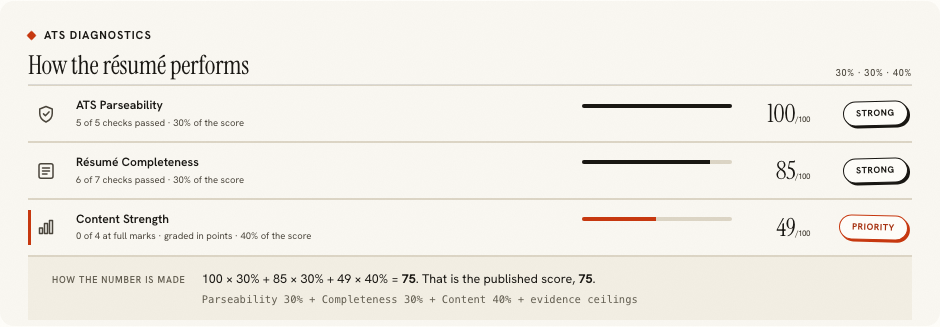
The subtlest one, and the most expensive. Everything extracts, in order, with no strange characters, and the score still falls, because the achievement lines arrived as a run of text rather than as lines. That is measurable: a recognised copy of our specimen kept parseability at 100 and lost the content dimension from 92 to 49.
The repair, which is the same in every case
Rebuild the document in the résumé builder. Repairing a damaged PDF directly is slow, unreliable and usually leaves the original fault in place. An export from here has a text layer written from the document, including bullet characters: we opened our own export and counted seven of them in the specimen's text.
Proving it afterwards
Run the ATS checker on the exported file and read the counts before the score. Words, lines and recognised headings should now resemble what is on the page. The reason to check the file rather than the editor's text is that the file is what an employer receives, which is the point of the export is the document.
Why repair tools are usually a detour
Because they work on the file rather than on the document. A tool that adds a text layer to a scan is doing recognition, which is the path already measured above and loses the line structure. A tool that reorders a scrambled layer is guessing at an order the file never recorded. Both produce a file that is better than it was and worse than one generated from a real document, and both take longer than rebuilding. The exception is a file you cannot rebuild because you no longer have the content, and then recognition followed by correction is the sensible route.
What this page does not claim
That every extractor will see what ours sees. Different systems use different libraries and will differ at the margins. The four symptoms above are properties of the file rather than of our reader, which is why the same file behaves badly in several places at once, and why the ten-second selection test is a fair proxy for all of them.
This is also a fault we have had ourselves, which is worth saying rather than presenting as somebody else's problem. Our own exports used to draw bullets as layout, so the text layer carried none, and the same résumé measured seven achievement lines as pasted text and four as an exported PDF. It was found by measuring rather than by inspection, fixed, and re-measured at parity. The whole episode is in pulling text back out of a PDF.
A final practical note about which file to test. Test the one you send, every time, and not a copy you re-exported from a different program on the way. Opening a PDF in a viewer and saving it again can change the text layer, usually harmlessly and occasionally not, and an editor that flattens a page produces exactly the image file this page is about. The chain from the builder's export to the employer's inbox should have as few steps in it as possible.
Rebuild the document, not the file
Import what can be read, correct the review, and export a PDF whose text layer is written rather than recognised.
Open the résumé builderScanned and image PDFsQuestions
- How do I test my own PDF
- Open it, select all the text, and paste it into a notes file. What you see is roughly what an extractor sees. If nothing selects, there is no text layer at all.
- What are the symptoms
- Nothing selectable, text that selects in the wrong order, odd glyphs where letters should be, and achievement lines that arrive as one run of text.
- What do those cost
- Three or more unreadable glyphs cost 18 points of parseability, decorative characters 8, a detected table or multi-column pattern 22. Lost line structure costs in the content dimension instead, which is 40% of the score.
- Can the file be repaired directly
- Rarely worth trying. Rebuilding the document is faster and produces a file whose text layer is written rather than reconstructed.
- Do exports from here have a clean text layer
- Yes, including bullet characters. We opened our own export and counted seven bullet glyphs in the text of the specimen.
Conxfolio is a free set of four career tools: a résumé builder with 37 rendered layouts, an ATS résumé checker that prints its own arithmetic, a cover letter builder that traces every proof paragraph back to the line it came from, and a portfolio builder with 22 authored designs. There is no account to create, nothing is held back for a paid plan, and no language model is used anywhere in the product, so the readers, the score and the letter are deterministic code you can check.