The screen between your file and your résumé, and what it shows
Most builders drop you into an editor full of fields and let you discover the parsing mistakes later. This one shows the reading first.
— you cannot correct what you were never shown.
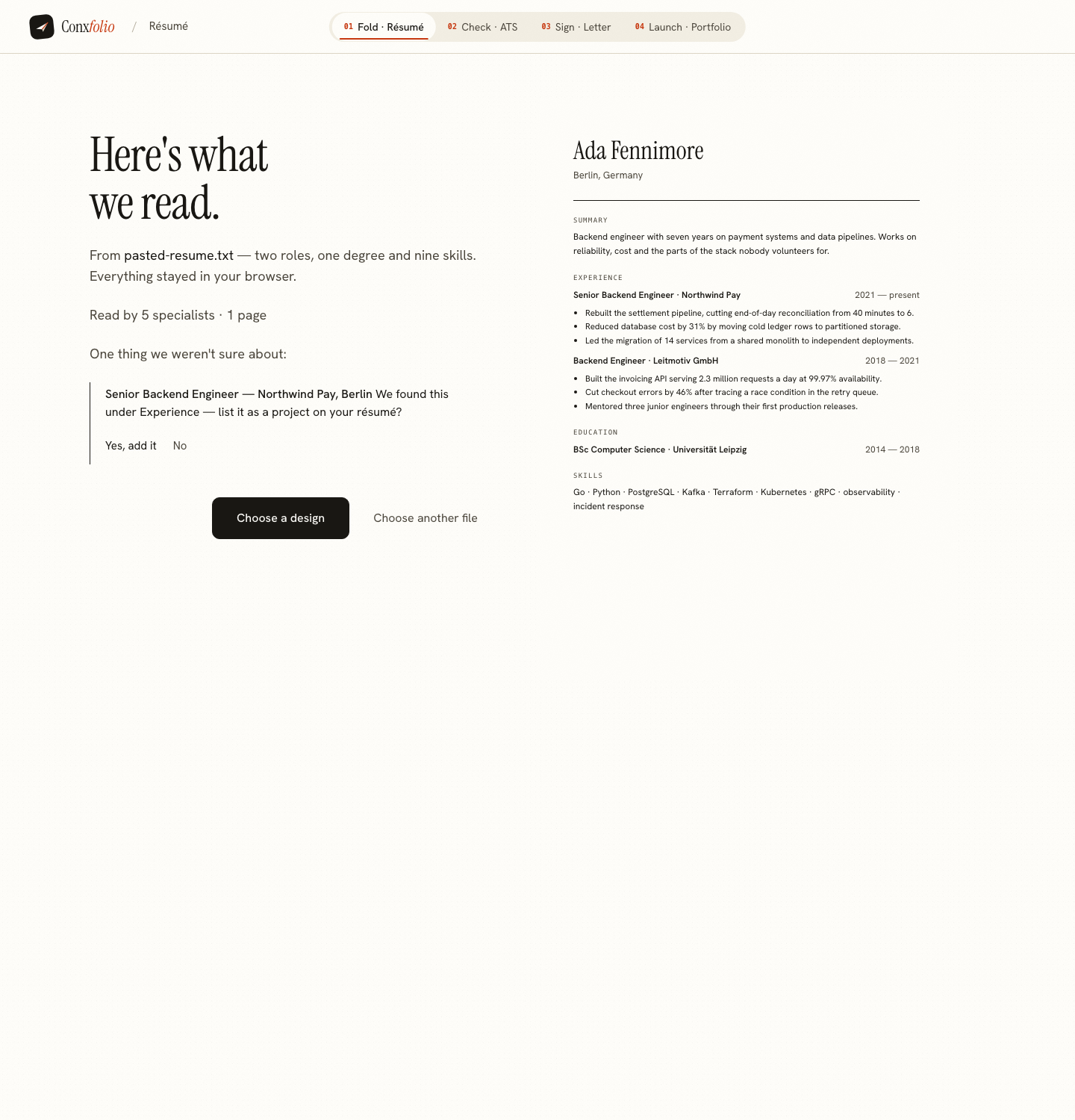
The moment a résumé tool is most likely to lie to you is the moment it imports your file. A parser that quietly puts your degree in the certifications block, or turns your last role's dates into the one before, hands you an editor that looks finished. You find the damage three applications later.
So the résumé builder puts a review between the file and the document, and the review is the whole reading, not a summary of it.
What it printed on a real file
We pasted a 162-word résumé for Ada Fennimore, an invented backend engineer, and photographed what came back. The header said what it had read: two roles, one degree and nine skills, with the reassurance that everything stayed in this browser. An earlier version of the review printed a reading line under the card, saying five specialists and one page; today's review shows the word count and the counts of what it found instead.
The blocks are counts, not adjectives
Each block on the review states a number. Experience, two found, with the two roles listed under it and the bullet count on each: four bullets on the first role, three on the second. Education, one entry. Skills, nine, listed as chips. Certifications, zero found. Languages, zero found. Projects, zero found. A block with nothing in it prints a sentence explaining what it looked for and where to add the thing by hand.
The empty fields are the interesting ones
Two fields on our import were reported as not found: Target role and LinkedIn. Neither was in the source document, so neither was filled. That is the rule the reader runs on: a field it could not read stays empty. It is the least impressive behaviour a parser can have and the only one you can trust, because the alternative is a field that looks correct and is a guess. The mechanics of that rule are in dropped fields and why they are counted.
One open question
The reading also had a question. It had read the first role under Experience and wanted to know whether it should sit on the page as a project instead, with two answers offered and a note that nothing is applied until you choose. A parser that is unsure has three options: guess, fail, or ask. Asking is the only one that leaves you in charge, and it is covered in reading questions instead of guesses.
The rendered page sits beside the fields
On the right of the review is the résumé itself, already rendered, with the headings and entries where the reading put them. You are not reading a list of key-value pairs and imagining the document. You are looking at the document, which is where a misfiled section is obvious in a second and a field list hides it for a week.
Nothing is saved until you move on
The review is a step in the journey, not a confirmation screen. From it you go to the designs, which is where the résumé is actually stored on this device. Until then the reading is a proposal. Choosing a design at that point does not change a word of the content, which is the subject of a design is not a rewrite.
What was sent, in one sentence
The product states it plainly, and the review repeats the important half in its header: everything stayed in your browser. The full version is that a file you import is read here first, and only the text it contains is sent to be sorted into fields. If this browser cannot read the file at all, the file itself is sent instead. Beyond that, the text of a résumé or a letter is sent when you run the ATS check, ask for a draft, or export a PDF.
That list is short enough to check, and the Word export is not on it, which we measured rather than asserted in your DOCX is built in your browser. The résumé itself lives in this browser under one storage key, written and then read back before the product says it saved.
What the review does not tell you
It does not tell you whether an employer's software will read the file the same way, because it has no access to that software and neither does anyone selling you a score for it. It does not judge your experience. It reports one thing: what came out of your document, and what did not. When you want the second question answered as a measurement, the ATS checker prints the counts it read and the sum it made from them.
Read your own file
Paste or upload a résumé and the review appears before anything is saved. Nothing is sent anywhere except the text, and nothing is filled in that your file did not say.
Open the résumé builderSee how the reader worksQuestions
- What happens to my file when I import it
- It is read in this browser first. Only the text it contains is sent to be sorted into fields, and only if this browser cannot read the file at all is the file itself sent. The review then sits in front of you before anything is saved.
- Why does it say a section was not found
- Because the reader could not confidently identify one, and saying so is more useful than inventing a heading. On our test import it reported zero certifications, zero languages and zero projects, each with the sentence explaining what it looked for.
- Can I fix a mistake at the review
- Yes. Every field on the review is editable, entries can be switched off, and an open question can be answered before anything is applied. The review is a step, not a receipt.
- Does the review prove my résumé is good
- No. It reports what was read, nothing more. Readability and evidence are measured separately by the ATS checker, which prints its own arithmetic rather than a verdict.
Conxfolio is a free set of four career tools: a résumé builder with 37 rendered layouts, an ATS résumé checker that prints its own arithmetic, a cover letter builder that traces every proof paragraph back to the line it came from, and a portfolio builder with 22 authored designs. There is no account to create, nothing is held back for a paid plan, and no language model is used anywhere in the product, so the readers, the score and the letter are deterministic code you can check.