How to get a free résumé PDF with no watermark
Export the PDF, then check the file rather than trusting the claim. This page gives the two commands and prints what they returned on the export taken for it.
— check the file, not the promise.
The watermark is the oldest lever in this category. Editing is free, the design is free, and the file you actually send carries a name that is not yours until money changes hands. The claim that a builder is watermark-free is therefore one of the easier claims to make and one of the more annoying to verify, because the mark is often faint.
So rather than assert it, here is the export, the two commands, and what they returned.
Making the export
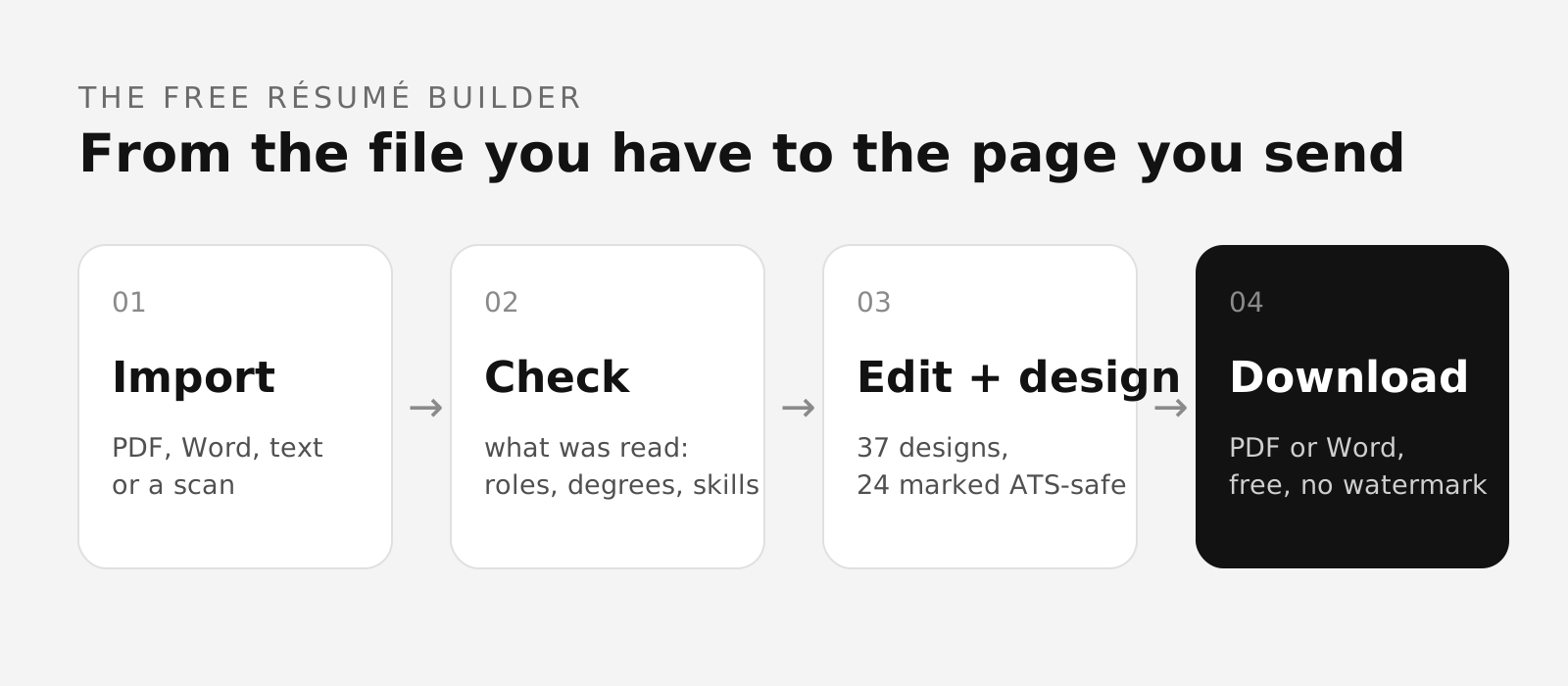
In the résumé builder, one menu labelled Download holds both formats: PDF, described in the product as ready to share, and DOCX, described as keep editing elsewhere. Choosing PDF starts the download. No plan chooser appears, because there are no plans.
Check one: look at it
Open the PDF and read the whole page, including the margins and the corners. Watermarks are usually placed diagonally across the middle or along a footer, and they are meant to be seen, because an invisible one would not work as a lever. This is the check that finds ninety per cent of them.
Check two: read the text layer
A drawn watermark is usually also a text object, so an extractor finds it even when it is pale on screen. Two commands from the poppler tools do the job, and both are available on Linux and macOS.
Running pdftotext file.pdf - prints the document's text. Searching that output for the name of the tool that made it is the whole test. On the export taken for this page, searching for the brand name, and for the words watermark, trial, upgrade and created with, returned nothing at all.
Running pdfinfo file.pdf prints the document's properties. On the same file that returned a single page, A4 at 594.96 by 841.92 points, PDF version 1.4, with Title Ada Fennimore — Résumé, Author Ada Fennimore, Creator Conxto and Producer Conxto (Skia/PDF). The candidate is invented for these captures and is named as invented wherever she appears.
The honest part of that result
The metadata does name the application. Creator and Producer are the fields every writing tool fills in: Word writes Microsoft Word there, a browser print writes the browser. Nothing is drawn on the page and nothing appears in the text, and the file does say which software rendered it, in the same field every other file does. Saying that plainly is better than claiming a file with no fingerprint at all.
If you would rather the Title and Author fields said something else, most PDF tools can edit them. They already carry the candidate's own name here rather than a product name.
The DOCX, checked the same way
A DOCX is a zip, so it can be listed. The measured export held three entries and nothing else: the content types file, the relationships file and the document itself, about four and a half kilobytes uncompressed. There was no docProps folder, which is where an application usually writes its own name. That file is assembled in your browser, which is why, as covered in the article on the DOCX builder, the export made no network request at all.
Why it is free in the first place
No language model is called anywhere in this product. The readers are deterministic code, the ATS score is arithmetic over rules, and the letter engine selects sentences from your own résumé. Without a per-visitor inference bill there is no pressure to meter the export, which is the whole reason a watermark is not needed here. The rest of what free covers is listed on making a résumé without paying.
After the export
Send the PDF through the ATS checker before you send it to anybody. The report prints what it read, in words, lines and recognised headings, and those counts are the honest preview of what an employer's extractor will get. If they are far below your page, the layout is losing text, and the format guide names the habits that cause it.
One thing this page does not claim: nothing here predicts how any employer's software will treat your file. It describes the file.
What to do if you find one in another tool
Do not pay to remove it in a hurry. Export whatever the tool will give you for nothing, usually a plain text or a lower-quality file, and import that here. The reading will list every field beside the text it came from, so a poor export is corrected once rather than retyped. Then choose a design and export a clean PDF from this side.
That route also solves the related trap, which is a free tier that limits you to a single page or a single version. A page limit is a design constraint imposed for commercial reasons, and the right length for your document is a question about your work. The page-length guide covers what actually decides it.
Export one and check it yourself
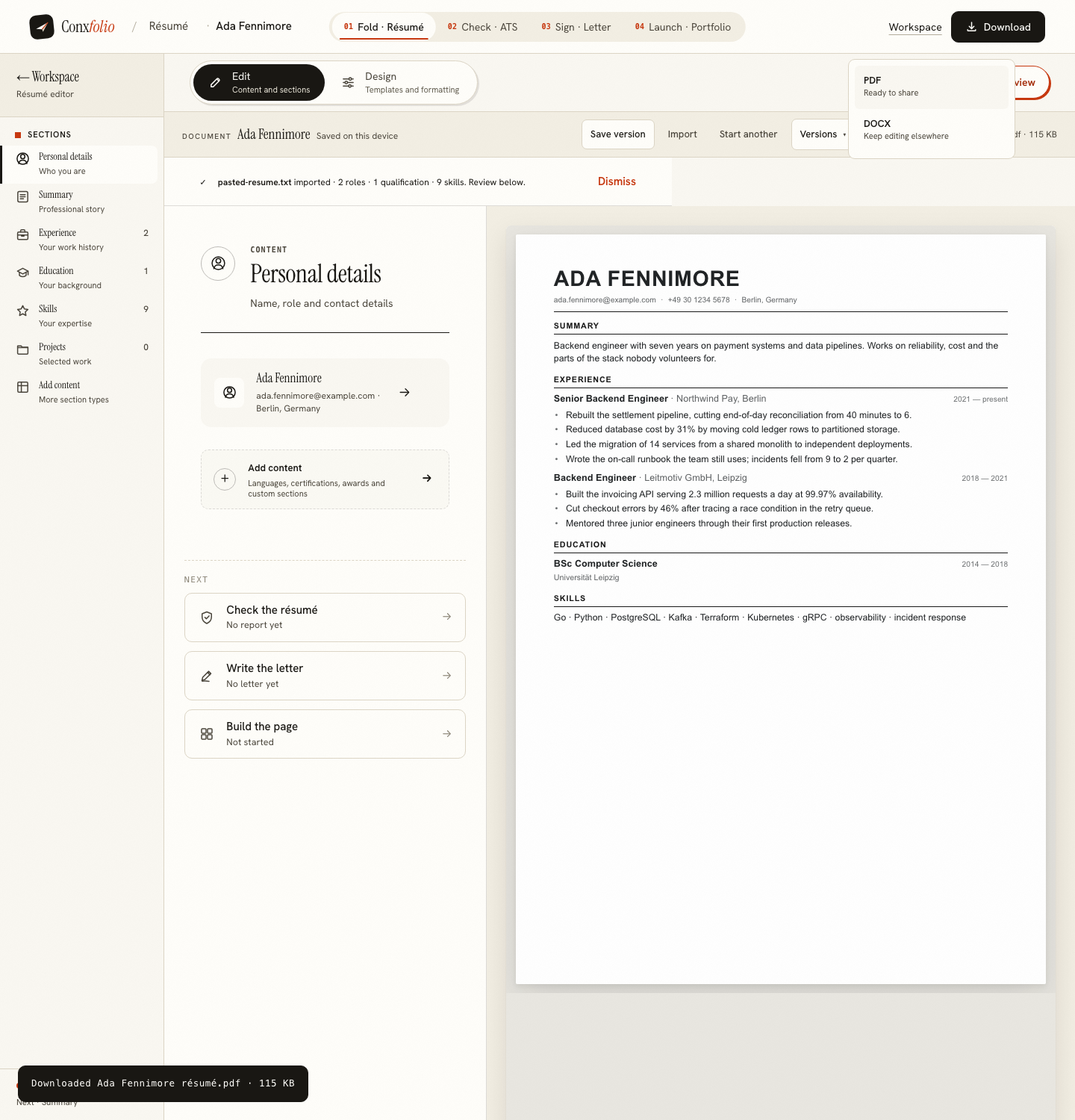
PDF and DOCX, free, unwatermarked, from any of the 37 designs. Then run the commands on this page over the file.
Open the résumé builderScore the file afterwardsQuestions
- Is the PDF watermarked on any plan
- There are no plans. There is one export, it is free, and the file carries no watermark. The check on this page is how to confirm that rather than take our word.
- Does the file mention Conxfolio anywhere
- In one place, and it is not on the page. The PDF's metadata names the application that produced it in the Creator and Producer fields, the way a word processor names itself. The measured file read Creator Conxto, Producer Conxto (Skia/PDF), with the Title and Author fields carrying the candidate's own name.
- What about the DOCX
- The measured DOCX was a three-entry zip with no document properties at all, so nothing in it names the application either. It is built in your browser.
- How do I check for a watermark myself
- Open the file and look at every page first. Then run pdftotext over it and search the output for the brand name of whatever produced it. A watermark that is drawn as text shows up there even when it is faint on screen.
- Does a watermark matter to an employer
- It tells a reader which tool you used, which is a small thing. It matters more to the person who paid, because a watermark is usually the lever that gets somebody to pay.
Conxfolio is a free set of four career tools: a résumé builder with 37 rendered layouts, an ATS résumé checker that prints its own arithmetic, a cover letter builder that traces every proof paragraph back to the line it came from, and a portfolio builder with 22 authored designs. There is no account to create, nothing is held back for a paid plan, and no language model is used anywhere in the product, so the readers, the score and the letter are deterministic code you can check.