Choosing the address your portfolio lives at
The address is the part of a portfolio you will type most often: into an email, onto a résumé, out loud on a telephone. It is worth a minute of thought.
— you will say this out loud. Make it sayable.
Most people choose a portfolio address in four seconds, at the end of an hour spent on everything else, and then live with it for years. It appears on a résumé, in the signature of every application email, and in conversations where somebody has to write it down from hearing it.
The test that matters
Say it out loud and have somebody else type it. If they get it right the first time, the handle is finished. Most failures are audible ones: a number that could be a word, a doubled letter, a dash where a listener expects nothing, a spelling that has two plausible forms.
This is a more useful test than any rule about length or keywords, because the address is spoken far more often than people expect.
What usually works
- Your name. First and last, run together or joined by a dash. It is the version people guess correctly.
- Name plus discipline, where the plain name is taken: the surname with a short word after it.
- A short professional name you already use elsewhere, so the address matches your other profiles.
What tends not to work: a year, which dates the page; a job title, which changes; a clever phrase, which has to be spelled out every time; and anything that reads differently when written down than when said.
The rules the sheet applies
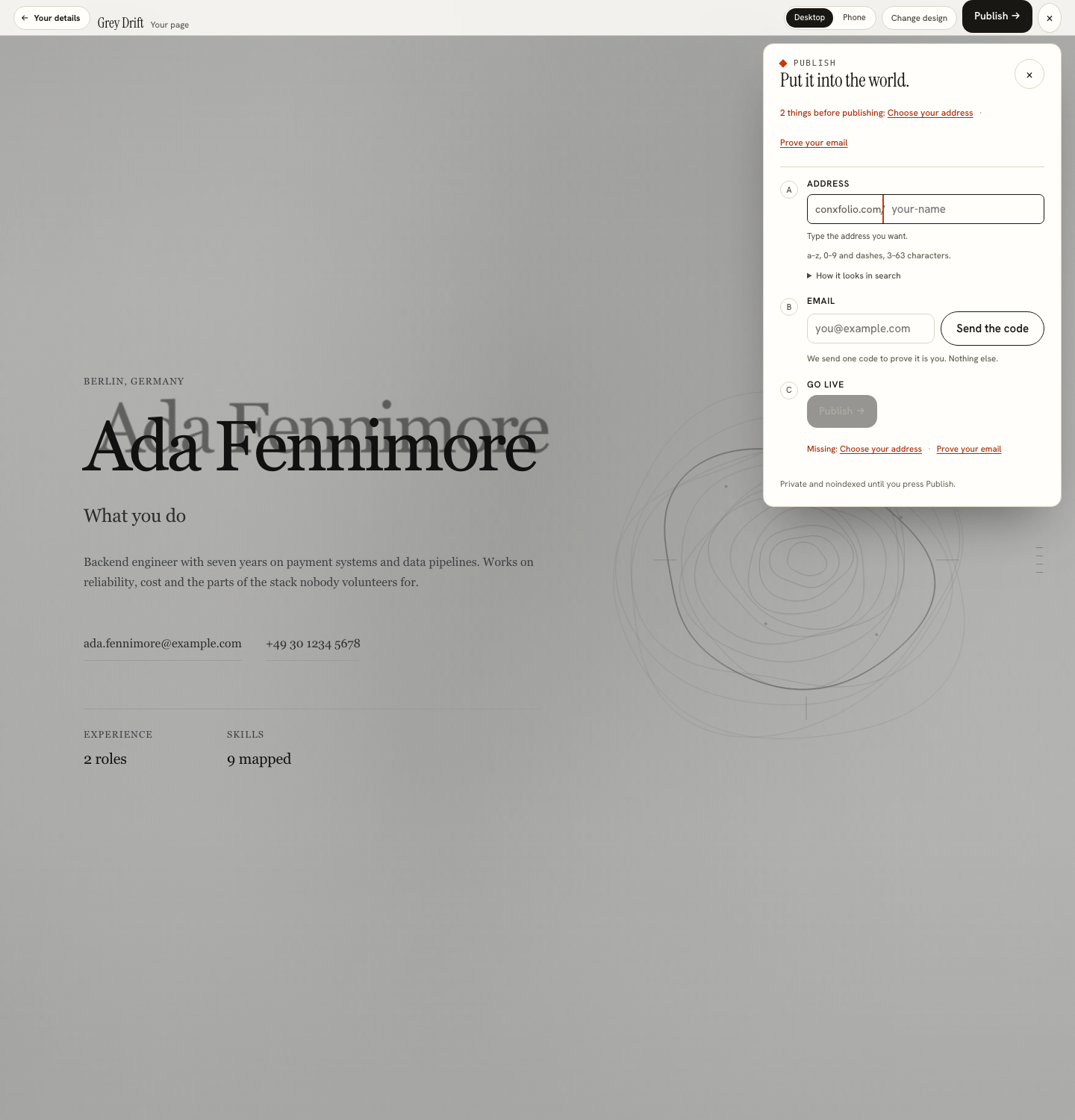
The publish sheet in the portfolio builder states the handle rules on the page itself: lower-case letters, digits and dashes, between 3 and 63 characters. The address it claims has the form of this site's domain followed by your handle, and the field shows the prefix beside the box as you type so the whole address is visible while you are choosing.
Handles are checked against a reserved list and against the ones already taken, so a name that is gone comes back as gone rather than failing later.
The email step
When you press publish, the sheet shows your edit key and a recovery code, once, and will not close until you say you saved them. The key opens the page for editing on any device at conxfolio.com/edit. The recovery code makes a new key if the first is lost or someone else gets it.
Nothing in the product requires an email address, publishing included. The publish sheet offers an optional recovery email, and if you leave it empty no email is stored. Every tool, all 22 designs and both page widths work with no account at all.
Nothing is public until you press publish
The sheet says so in its own words: private and noindexed until you press publish. That means the checking step, where the real page renders at desktop and phone width, is genuinely private, and you can take as long as you like over it. It also means a half-finished page cannot be found by accident while you are still deciding what to switch off.
Changing it later
An address you have given out is an address you cannot quietly retire, because every email carrying it now points somewhere else. Claiming a different handle is a new claim, and the people holding the old link will need the new one. That asymmetry is the reason to spend the extra minute at the start rather than the extra hour afterwards.
Taking a page down is a different matter and is straightforward: a published page can be unpublished again by whoever holds its edit key.
Where the address goes afterwards
On the résumé, in the header, beside the email address, where linking a portfolio from a résumé covers what an extractor does to a long address. In the signature of application emails. On a business card if you still carry them. What it does not need is a paragraph explaining that it is your portfolio, because an address that looks like a name is self-explanatory.
If the page itself is not ready yet, the three-step walkthrough covers getting there from a résumé you already have.
Check it before you commit
Type the handle and read the whole address back, prefix included, because the two halves are chosen separately and judged together. A handle that looks fine on its own can read differently attached to a domain, and that reading is the one that goes on a résumé.
The other check is whether it matches how you are named everywhere else. If your professional network profile, your code repository and your email all use one form of your name, the page should use it too. A reader who has met three consistent versions and then a fourth has been given a small puzzle to solve, and consistency here is free.
What happens to the address afterwards
It goes into documents you cannot edit later: a sent email, a printed application, somebody else's notes. That is the asymmetry behind all of the advice above, and it is the reason this is worth a minute at the point of claiming rather than an hour of regret afterwards.
Claim the address when the page is ready
Type the handle you want, press publish, and save the edit key it gives you. Nothing is public before that.
Open the portfolio builderSee the 22 designsQuestions
- What characters can a handle use
- The publish sheet states the rules on the page: lower-case letters, digits and dashes, between 3 and 63 characters.
- Does publishing need an email address
- No. Publishing gives you an edit key and a recovery code; whoever holds the key can edit the page. A recovery email is optional, and it is used only to send you a new key or tell you when the page changes.
- Is my page visible before I publish
- No. The publish sheet states that the page is private and noindexed until you press publish.
- Can I change the handle later
- Claiming a different address is a new claim, and anyone who has the old link will need the new one. This is the argument for getting it right the first time.
- Can I take the page down
- Yes. A published page can be unpublished again by whoever holds its edit key.
Conxfolio is a free set of four career tools: a résumé builder with 37 rendered layouts, an ATS résumé checker that prints its own arithmetic, a cover letter builder that traces every proof paragraph back to the line it came from, and a portfolio builder with 22 authored designs. There is no account to create, nothing is held back for a paid plan, and no language model is used anywhere in the product, so the readers, the score and the letter are deterministic code you can check.