What to put in a portfolio, and what to switch off
A portfolio page fails by including too much more often than by including too little. The useful question is which entries you would defend for ten minutes each.
— everything on the page has to earn the scroll.
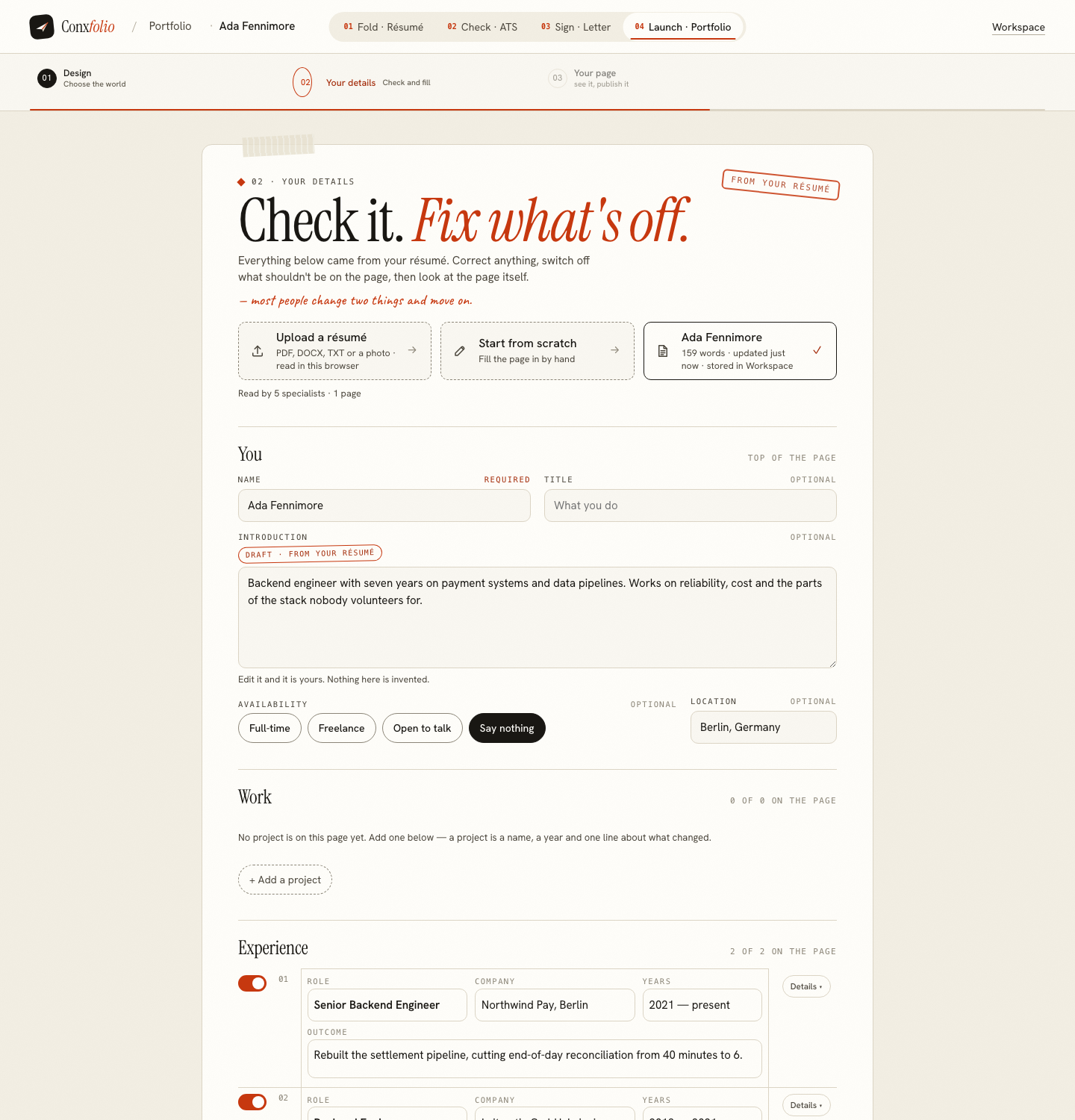
Portfolio advice usually answers a different question from the one people ask. The question is not what a portfolio may contain, which is anything, but what should be on this page for the next reader, which is much less.
A useful rule: everything on the page should be something you would be happy to be asked about for ten minutes. Anything that fails that test is decoration.
The six sections, and what each is for
- You. Name, an optional title, a short introduction, availability and a location. The introduction is the only place on the page where you write about yourself rather than about work, so two or three sentences is the whole budget.
- Work. Projects. The builder's own definition is a name, a year and one line about what changed, with an optional description, a link, an image and tags.
- Experience. Role, company, years and the outcome. This is the résumé material, given more room for the outcome than a bullet had.
- Skills. A short set, as chips. Short is the operative word.
- More. Education, certifications and languages, each with the line it says on the page.
- Contact. Email, phone, and the links you want followed. Empty fields do not print.
The counter is the decision
Every section in the rail of the portfolio builder carries a count of what it holds, so the total is visible while you edit. It is a small thing and it changes how the builder is used, because the number makes the total visible while you are still deciding.
The advice hidden in that number is to make it smaller. Four projects with an outcome each beat nine without. How many projects to show goes through the arithmetic.
What earns a place
A piece of work earns its place when you can say what it was, when it happened, and what changed because of it. For written work that third part is where most entries are decided. That is the builder's three-part definition of a project and it is a good editorial filter as well. The third part is where most entries fail: a project that shipped and did nothing measurable is still worth including if you can say honestly what it taught or unblocked, but a project you cannot describe the effect of is an entry with no argument in it.
A number helps and is not required. Finding the figure in work that seems unmeasurable is the same exercise here as on a résumé.
What to switch off
Roles from a previous career that the page is not making an argument about. Skills you would not want to be tested on. Certifications that expired. A long list of tools, which reads as a keyword field rather than as a portfolio. And any project you included because it was large rather than because it was good.
Switching off is a deliberate action in the builder rather than a deletion, so nothing is lost and the page gets shorter. That is the correct relationship: the material stays in your draft, the page shows the argument.
Longer entries, and where they belong
Each entry has a details panel, which is where a description, a link, an image and tags sit. For two or three of your strongest projects this is worth filling properly, and the shape it wants is the same one a case study uses: the situation, what you did, what changed. For the rest, the single outcome line is enough and more would slow the page down.
What the page does not invent
The draft comes from your résumé, and the Source in the builder's toolbar says which one: edit anything and it is yours. A field the reading could not fill is left empty rather than guessed at, which is occasionally inconvenient and always correct. Nothing here writes an entry for you, and no language model is used anywhere in this product.
Then look at it
The last step before publishing renders the real page at desktop and phone width, which is the only way to find out whether the page you assembled in a form reads as a page. The narrow width is the one worth looking at first. Sections that seemed reasonable in a list often look thin in a layout, and the fix is usually to switch two things off rather than to add a third. The full walkthrough covers the three steps in order.
Availability, and what it signals
The You section carries an availability setting with four states in the product: full-time, freelance, open to talk, and say nothing. The last of those is a real option rather than an omission, and it is the right one when your situation is complicated or when the page is a permanent fixture rather than a search.
Where you do set it, keep it current. An availability that has been wrong for a year is the kind of stale detail that makes a reader wonder what else on the page is out of date, and it is a two-second fix in the builder followed by a republish. The same applies to the location, which changes more often than people update it.
Switch things on and look
The builder's rail counts what each section holds, and the next step renders the page itself at both widths.
Open the portfolio builderSee the 22 designsQuestions
- Should I put everything I have done on it
- No. A page showing everything is a résumé with pictures. The counts in the builder's rail exist to make the total visible, because the total is the decision.
- What makes a project worth including
- A name, a year and one line about what changed. That is how the builder defines a project, and it is a good test: if you cannot write the line, the entry is not ready.
- Do I need images
- No. An image is optional on an entry, alongside a description, a link and tags. A page of text entries with real outcomes reads better than a page of screenshots without them.
- What about contact details
- Put the ones you want used. The contact section notes that empty fields do not print, so leaving a field blank removes it from the page rather than leaving a gap.
- Can I add something the résumé never had
- Yes. Every section takes new entries, and you write them yourself. Nothing is generated for you.
Conxfolio is a free set of four career tools: a résumé builder with 37 rendered layouts, an ATS résumé checker that prints its own arithmetic, a cover letter builder that traces every proof paragraph back to the line it came from, and a portfolio builder with 22 authored designs. There is no account to create, nothing is held back for a paid plan, and no language model is used anywhere in the product, so the readers, the score and the letter are deterministic code you can check.