22 portfolio designs, each one a page somebody drew
A portfolio theme is a set of slots. A world is a page with a point of view, and the difference is visible the moment you open one.
— twenty pages, not one page with twenty skins.
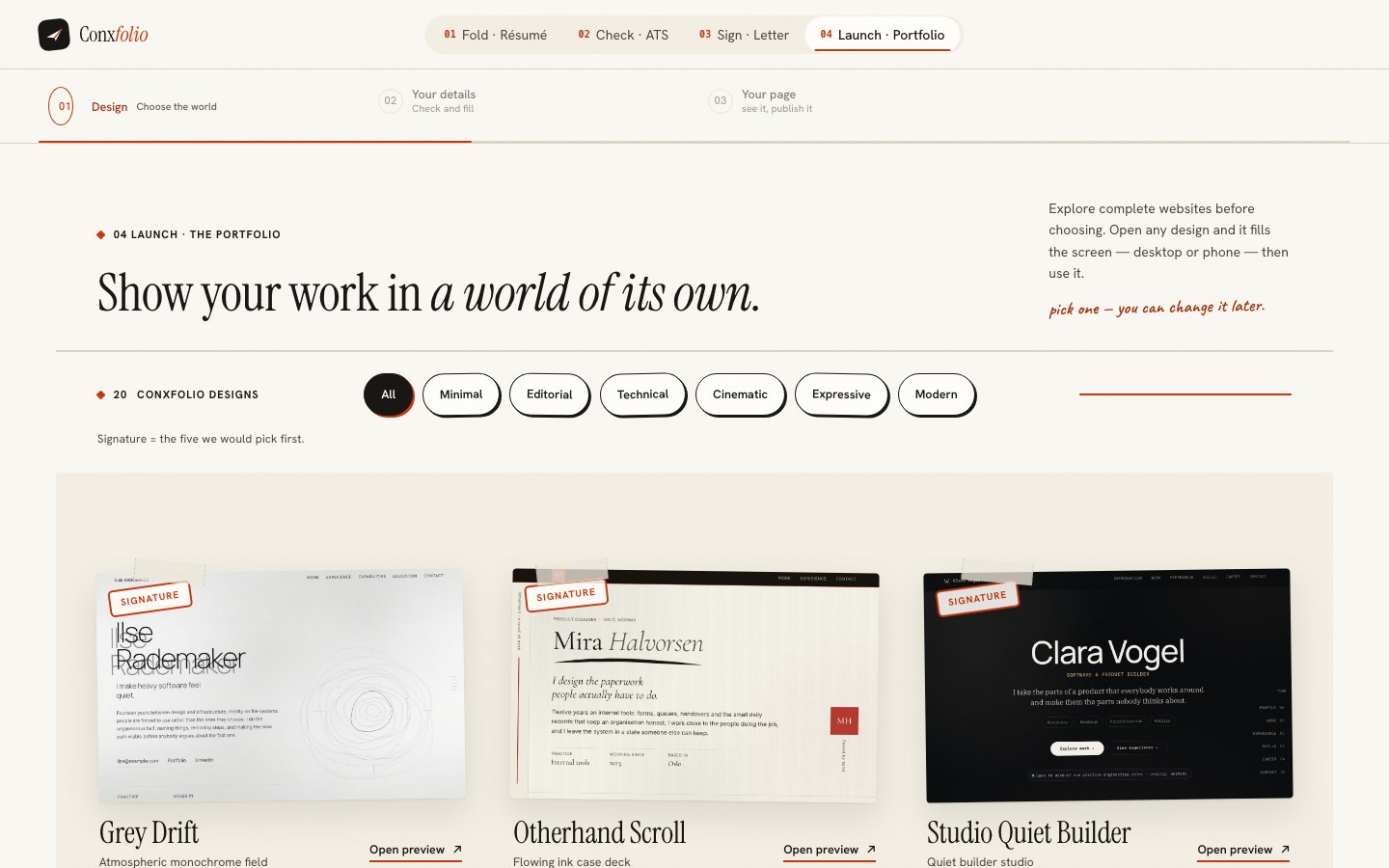
Most portfolio builders ship one page and twenty colour schemes. The grid is the same, the hero is the same, the project card is the same, and the difference between the options is a palette and a typeface. That is a theme system, and it produces twenty sites that are recognisably the same site.
The portfolio builder ships 22 separately built pages.
What is actually different between them
The structure. One design runs a career as a vertical scroll of ink-drawn case panels. Another reads it as a control room with an operational corridor through the middle. Another lays it out as horizontal architecture, another as a single line of light, another as temperature. They do not share a hero, a grid or a rhythm, and they cannot be produced from each other by changing variables.
The six directions
The gallery filter groups them into 6: minimal, editorial, technical, cinematic, expressive and modern. The directions are a way of finding your half of the room quickly. An engineer looking for a page that does not perform starts in technical or minimal; somebody whose work is visual starts in cinematic or expressive; a writer starts in editorial.
An opinion, labelled as one
Under the filter sits a line saying the signature mark is the five we would pick first. That is a preference with a name on it rather than a quality ranking, and the twenty are ordered on the page by the same judgement. Stating it is more useful than hiding it behind a sort control called popular, which in most products means something else entirely.
Your content, not sample content
The material comes from the roles, projects and outcomes already in your résumé. The builder reads them in when you choose Fill from my résumé, you switch each entry to Shown or Hidden, and you correct it: a name, a period, one line about what changed, and optionally a description, a link, an image and tags. The page says what it will not do in its own words: nothing here is invented.
Seeing it before anyone else does
Opening a design fills the screen with the whole page rather than a card, and once your content is in, Preview & publish renders the real thing at desktop and phone width before anything is public. Those two views are the subject of phone width is the page that publishes, and the relationship between the gallery poster and the finished page is in the poster and the page agree.
Reading the gallery quickly
Filter to your direction first, which removes about two thirds of the set. Then open the first card in that direction and use the arrows in the full-size view to walk the rest, because reading four pages in a row tells you more about which one suits your material than reading four posters in a grid. Each page carries its name, its direction and a one-line description in the same place.
What you are looking for is where the page puts its weight. Some of these designs open on a statement and hold the work back; others start in the middle of a case study. If your strongest evidence is one project, the second kind is on your side. If your strongest evidence is a decade of roles, the first kind gives you somewhere to put them. The switch between desktop and phone is on the same bar, and the narrow view is the one that decides it, for the reasons in phone width is the page that publishes.
What a design cannot do
It cannot supply work you have not done. A cinematic page built for three projects looks thin with one, and no direction rescues a portfolio with nothing in it, which is worth knowing before spending an evening choosing between twenty of them. The honest order is the same as everywhere else in this product: get the evidence right in the résumé first, then choose the room it stands in. What the word authored means here, and what it costs to work this way, is in what an authored design means.
Open a world and read it
Every design opens full size before you choose. Then your own roles, projects and outcomes flow into it from the résumé you already have.
Open the portfolio builderBrowse the portfolio designsQuestions
- How many portfolio designs are there
- 22, grouped into 6 directions: minimal, editorial, technical, cinematic, expressive and modern.
- What does the signature note mean
- The gallery carries a line saying the signature mark is the five we would pick first. It is an opinion, labelled as one, rather than a ranking of quality.
- Are these themes with different colours
- No. Each is a separately built page with its own structure, motion and typography. Two of them share a direction and almost nothing else.
- Where does the content come from
- From the roles, projects and outcomes already in your résumé. You switch on what belongs on the page and correct each entry; nothing is invented for you.
- Can I change design after building the page
- Yes. The design and your content are separate, and Preview & publish carries a change-design control beside the publish button.
Conxfolio is a free set of four career tools: a résumé builder with 37 rendered layouts, an ATS résumé checker that prints its own arithmetic, a cover letter builder that traces every proof paragraph back to the line it came from, and a portfolio builder with 22 authored designs. There is no account to create, nothing is held back for a paid plan, and no language model is used anywhere in the product, so the readers, the score and the letter are deterministic code you can check.